DJI drones do not have headless mode. That surprises a lot of people who've been reading beginner guides, because headless mode is one of the most-discussed features in drone tutorials. The answer is that headless mode exists almost exclusively on budget toy drones from Holy Stone, Potensic, DEERC, and similar brands. DJI dropped its equivalent features years ago and has not brought them back.
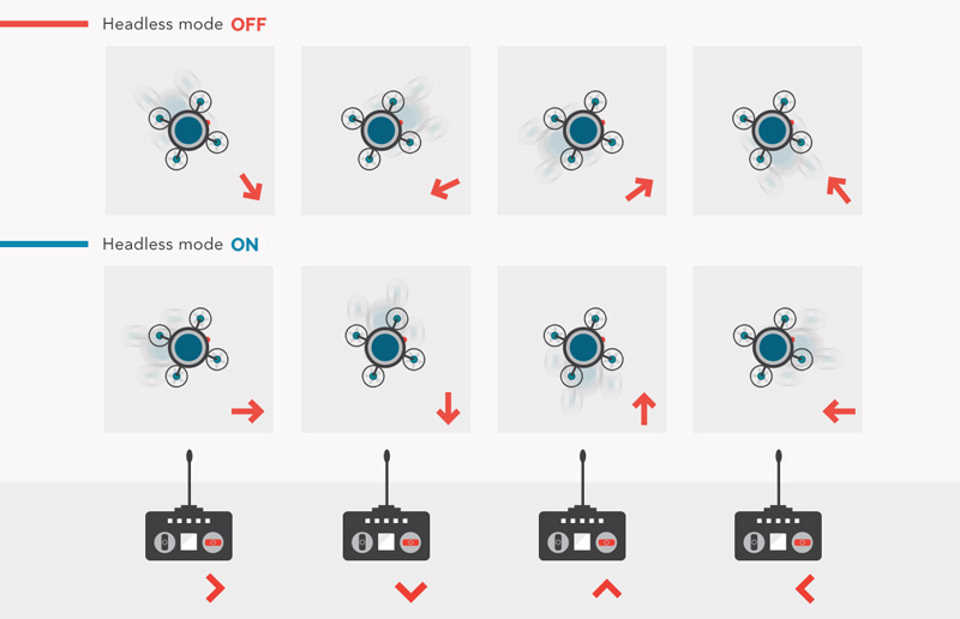
Headless mode solves a real problem: when a drone flies away from you and turns around, pushing the right stick no longer moves the drone to your right. It moves the drone to its own right, which is now your left. For a beginner who hasn't yet built spatial awareness, this creates crashes. Headless mode locks all stick inputs to the pilot's original facing direction, so right is always right no matter where the drone points.
This guide explains how headless mode works technically, which drones have it, when it is actually useful versus harmful to your development as a pilot, and what DJI offers instead.
What Headless Mode Does on a Drone
In headless mode, forward always means away from the pilot regardless of which direction the drone faces. In standard mode, forward means where the drone's nose points.
The Orientation Problem Headless Mode Solves
A drone has its own sense of forward: wherever its nose (front) points. In standard mode, pushing the pitch stick forward moves the drone toward its nose. If the drone has rotated 180 degrees and is facing you, pushing pitch forward sends it toward you. Most new pilots find this disorienting and crash.
Headless mode changes the frame of reference. Instead of inputs being relative to the drone's nose, they are relative to the pilot's original position at takeoff. Push forward and the drone goes away from you. Pull back and it comes toward you. Turn the drone left or right, the controls do not change.
The Technical Explanation
When you activate headless mode (usually before takeoff), the drone's internal compass (magnetometer) records the current heading as the fixed reference direction. From that point on, the flight computer applies a rotation transform to all stick inputs: it calculates the angular difference between the current drone heading and the stored reference heading, then rotates your stick inputs by that amount before sending them to the motors.
Three sensors work together to maintain this: the gyroscope tracks rotation rate, the accelerometer tracks movement, and the magnetometer provides the absolute compass bearing. All are MEMS (Micro Electro Mechanical Systems) components. The stored reference bearing is reset each time you activate headless mode.
Note: Headless mode must be activated before takeoff with the drone and controller properly aligned. Activating mid-flight after the drone has turned significantly can produce erratic behavior because the reference point was set relative to a position the pilot may have moved away from.
How to Activate Headless Mode
The activation method varies by drone model. Common approaches:
Dedicated button: a button labeled "H" or "H/L" held for 2-3 seconds; LED indicator or beep confirms activation
Stick combination: both sticks pressed down and toward each other simultaneously (similar to arm/disarm)
App toggle: a headless mode switch in the companion app, usually under flight settings
Pre-arm switch: a dedicated headless/standard toggle on the controller face
Check your drone's manual for the exact method, and verify the drone's LED changes color or blinks to confirm activation before takeoff.
Do DJI Drones Have Headless Mode?
DJI consumer drones (Mini 3, Mini 4 Pro, Mini 5 Pro, Air 3S, Mavic 4 Pro, DJI Flip, DJI Neo) do not have headless mode. The feature was discontinued from the DJI lineup after the original Phantom and early Mavic era.
What DJI Had: Course Lock and Home Lock
DJI's older equivalent features were called Course Lock and Home Lock, both part of the Intelligent Orientation Control (IOC) system. Course Lock locked the forward direction to the heading at the moment of activation, regardless of subsequent drone rotation. Home Lock made the pull-back stick always move the drone toward the home point.
These features appeared on the Phantom 3/4, early Mavic Pro, and Mavic Pro Platinum. They were removed as DJI shifted toward more sophisticated autonomous flight modes and Return to Home automation. No current DJI consumer drone includes Course Lock or Home Lock in the DJI Fly app.
Why DJI Dropped the Feature
DJI's engineering direction has been toward GPS-based autonomous assistance rather than control-input remapping. Features like ActiveTrack, MasterShots, QuickShots, and intelligent Return to Home address the beginner difficulty problem from a different direction: the drone handles the orientation work autonomously rather than remapping the pilot's inputs. From DJI's perspective, a pilot who needs headless mode on a DJI drone should probably be using ActiveTrack instead.
Tip: If you are specifically looking for headless mode, you are shopping in the wrong product category. DJI drones start at around $299 (DJI Neo) and their GPS stabilization makes orientation confusion a non-issue for most beginners. Budget drones with headless mode typically cost $30-$100 and lack GPS entirely.
Which Drones Have Headless Mode
Budget Beginner Drones (Yes)
Headless mode is standard on most budget toy drones sold under the $100 price point. The major brands include:
Holy Stone: HS110D, HS175D, HS430, HS420, HS450, and most of their lineup
DEERC: D10, D20, D50, and similar models
Potensic: entry-level models (not the Atom GPS series)
Snaptain: S5C, SP650, and most Wi-Fi models
Syma: X5SW, X500, and most of the X-series
Hubsan: H501S, H122D, and similar mid-tier models
Altair Aerial: AA108 and AA300 beginner models
Generic E88-type folding drones (sold under dozens of brand names on Amazon)
These drones lack GPS. Headless mode compensates by making the controls less disorienting for a beginner who has never flown before. Without GPS, the drone drifts with the wind and requires constant stick corrections, which makes orientation confusion significantly worse.
GPS Consumer Drones (No)
GPS drones from DJI, Autel, and similar manufacturers do not include headless mode:
Brand / Model
Headless Mode
Reason
DJI Mini 3, Mini 4 Pro, Mini 5 Pro
No
GPS stabilization makes it unnecessary
DJI Air 3S, Mavic 4 Pro
No
Professional audience; orientation mastery expected
DJI Neo / Neo 2
No
Uses autonomous shot modes instead
Autel Evo Nano Plus, Evo Lite Plus
No
GPS-assisted; no input remapping needed
HoverAir X1 / X1 Pro Max
No
Fully autonomous; no manual orientation control
FPV Drones (No)
FPV drones do not have headless mode because it is fundamentally incompatible with first-person perspective flying. In FPV, the pilot views the world from the drone's nose camera. Headless mode would remap inputs relative to a ground position that the pilot cannot see, which would be disorienting rather than helpful. FPV pilots must develop standard orientation control from the start.
When Headless Mode Helps (and When It Hurts)
1stFlight only
30m+Distance recovery
0Professional use cases
Useful Situations for Headless Mode
Headless mode has a narrow but genuine use case:
First flights on a toy drone: removes the orientation problem while the pilot learns throttle and basic movement
Distance recovery: if the drone has drifted far away and you cannot tell which way it is facing, pulling back will always return it toward you
Low-visibility conditions: fog, dusk, or high altitude where the drone's front/back is indistinguishable by sight
Very young or older pilots who find orientation reversal consistently disorienting
When Headless Mode Causes Problems
Headless mode has real limitations that can cause accidents:
Compass interference: metal structures, power lines, and reinforced concrete corrupt the stored compass reference. If the reference bearing drifts, your stick inputs will point in unexpected directions
Pilot movement: if you walk 50 meters from your original takeoff spot, the headless mode reference is now based on a position you are no longer at. The controls will be incorrect relative to your new position
GPS and RTH interaction: on drones where both are present, activating headless mode can conflict with GPS-based positioning, causing unexpected behavior during Return to Home
Headless Mode and Photography: A Major Limitation
Headless mode remaps movement inputs, but it does not remap the camera. The drone's camera always points in the direction the drone's nose faces. If you push the drone right in headless mode, the drone moves to your right, but the camera still points wherever the nose is pointing. For a pilot who wants to frame a specific shot, the camera direction becomes unpredictable: the subject might end up behind the camera, to the side, or at an odd angle.
This is why headless mode has zero professional use cases. Drone photography and video require precise control over where the camera points. Headless mode decouples movement from orientation in a way that makes intentional framing impossible. If you are trying to photograph anything specific, disable headless mode and learn to fly in standard orientation.
The Training Wheels Problem
The core criticism of headless mode is that it builds dependency. Flying with standard orientation is a learnable skill that takes 2-4 practice sessions for most people. Pilots who rely exclusively on headless mode never develop this skill. When they eventually fly a GPS drone (which has no headless mode), they start from scratch with orientation control. The analogy is accurate: headless mode is training wheels, and training wheels work against learning to balance.
Note: FAA Part 107 knowledge tests and practical skill evaluations require orientation control in standard mode. There is no headless mode option during flight proficiency assessments.
Headless Mode vs Standard Mode: Common Questions
Understanding the three axes of drone control (pitch, roll, yaw) is the foundation of standard orientation flying. Headless mode masks this by remapping inputs to the pilot's reference frame.
Does Headless Mode Affect Battery Life or Speed?
No. Headless mode only changes how stick inputs are interpreted by the flight computer. It does not change motor output, flight speed, or battery consumption. The compute overhead for the compass reference calculation is negligible on any modern flight controller. If your drone seems to fly differently in headless mode, it is pilot perception, not a real change in performance.
Can You Switch Between Headless and Standard Mid-Flight?
Most drones allow mid-flight switching, but it is not recommended. When you switch from headless to standard, controls immediately revert to drone-nose-forward orientation. If the drone is turned sideways relative to you when you switch, your next stick input may push the drone in an unexpected direction. Switching mid-flight is safer if the drone is hovering stationary and facing directly away from you.
Does Headless Mode Replace Return to Home?
No. Return to Home is a GPS-based feature that autonomously navigates the drone back to its recorded home point. Headless mode has no knowledge of the drone's GPS position. Pulling back on the stick in headless mode moves the drone toward the pilot's stored reference direction, which may not align with the actual home point if the pilot has moved. On drones with both features, they operate independently.
Should Beginners Learn in Headless Mode or Standard Mode?
Use headless mode for the very first 1-2 flights if you find orientation reversal causes immediate crashes. After that, switch to standard mode and stay there. Most pilots on GPS drones find standard mode intuitive within a few sessions. On toy drones without GPS, the skill takes longer but is still achievable through practice in open areas with no obstacles. The goal is always to graduate to standard mode before flying anywhere that matters.
FAQ
Headless mode locks the drone's control inputs to the pilot's original facing direction at takeoff. In standard mode, pushing forward moves the drone toward its own nose. In headless mode, pushing forward always moves the drone away from where the pilot was standing when headless mode was activated, regardless of which way the drone is pointing.
No. Current DJI drones (Mini 3, Mini 4 Pro, Mini 5 Pro, Air 3S, Mavic 4 Pro, Neo, Flip) do not have headless mode. DJI removed its equivalent features (Course Lock and Home Lock) from the Mavic Pro Platinum era onward. GPS stabilization and autonomous flight modes handle the beginner difficulty problem differently.
Budget toy drones in the $30-$100 range almost universally include headless mode. Major brands include Holy Stone (HS110D, HS175D, HS430, HS420), DEERC (D10, D20), Potensic entry-level models, and most generic folding camera drones sold on Amazon. GPS-equipped drones from DJI, Autel, and similar brands do not include headless mode.
It is acceptable for the very first 1-2 flights to prevent immediate frustration, but relying on it long-term prevents developing standard orientation control. GPS drones (which have no headless mode) are generally a better beginner choice than toy drones with headless mode, because GPS stabilization eliminates the root cause of orientation confusion.
No. Headless mode only changes how stick inputs are processed by the flight computer. It does not affect motor output, maximum speed, or battery drain. The compute overhead is negligible.
Yes, under certain conditions. Compass interference from metal structures or power lines can corrupt the stored reference bearing, making stick inputs point in unexpected directions. If the pilot moves significantly from the original activation point, the control reference is now wrong relative to their new position. Compass-calibration failures in headless mode are a known cause of flyaways on budget drones.
They are functionally similar. Course Lock was DJI's version: it locked the forward direction to the drone's heading at activation. Headless mode on budget drones operates on the same principle using the compass as the reference. The main difference is that DJI's implementation was part of a more sophisticated Intelligent Orientation Control system paired with GPS, while budget drone headless mode works without GPS.
It can, but indoor compass reliability is poor. Interior environments contain metal framing, electrical wiring, and appliances that interfere with the magnetometer. The stored reference bearing can drift or be inaccurate indoors. Many toy drones switch to optical flow (camera-based hovering) or altitude hold only in indoor flight, and headless mode may not function correctly without a reliable compass reading.
Paul Posea founded Dronesgator in 2015 and has been reviewing consumer drones for over a decade. With 195 YouTube drone reviews drawing 3.55 million views and published work on Digital Photography School, he combines hands-on flight testing with data-driven analysis to help pilots find the right drone.
Marcus Taylor is a UK CAA certified drone pilot and owner of Deployed Consultancy Ltd. With 6 years of commercial experience spanning UN site surveys in West Africa, aerial photography across Europe, Africa, and Japan, and defence consulting, he verifies the technical accuracy of Dronesgator's drone reviews and guides.