• Find My Drone

Best SD Cards for DJI Drones in 2026: 8 Tested Picks

Updated

By Paul Posea

Best SD Cards for DJI Drones in 2026: 8 Tested Picks - drone reviews and comparison

SanDisk Extreme Pro 256GB - Best Overall

FeatureSpec
Capacity256GB
Speed ClassV30, U3, C10
BusUHS-I
Read Speed200 MB/s
Write Speed140 MB/s
App PerformanceA2
Operating Temp-25°C to 85°C
WarrantyLifetime limited
Pros and Cons
Pros
  • Fastest UHS-I read speeds at 200 MB/s, which you'll actually feel when offloading footage to your laptop
  • 140 MB/s write speed gives plenty of headroom above the V30 minimum for 4K/60fps recording
  • On DJI's recommended list for virtually every drone they've made in the last five years
  • A2 app performance rating means the card handles random read/write operations well
  • Lifetime limited warranty and rated to survive water, shocks, and X-rays
  • Available up to 1TB if you need more capacity for the Mini 5 Pro or Mavic 4 Pro
Cons
  • Costs $10-15 more than the regular Extreme for modest speed gains you won't notice during recording
  • UHS-I interface means the 200 MB/s read speed requires a UHS-I compatible reader to reach
  • Overkill for budget drones like the Mini 4K that only record at lower bitrates
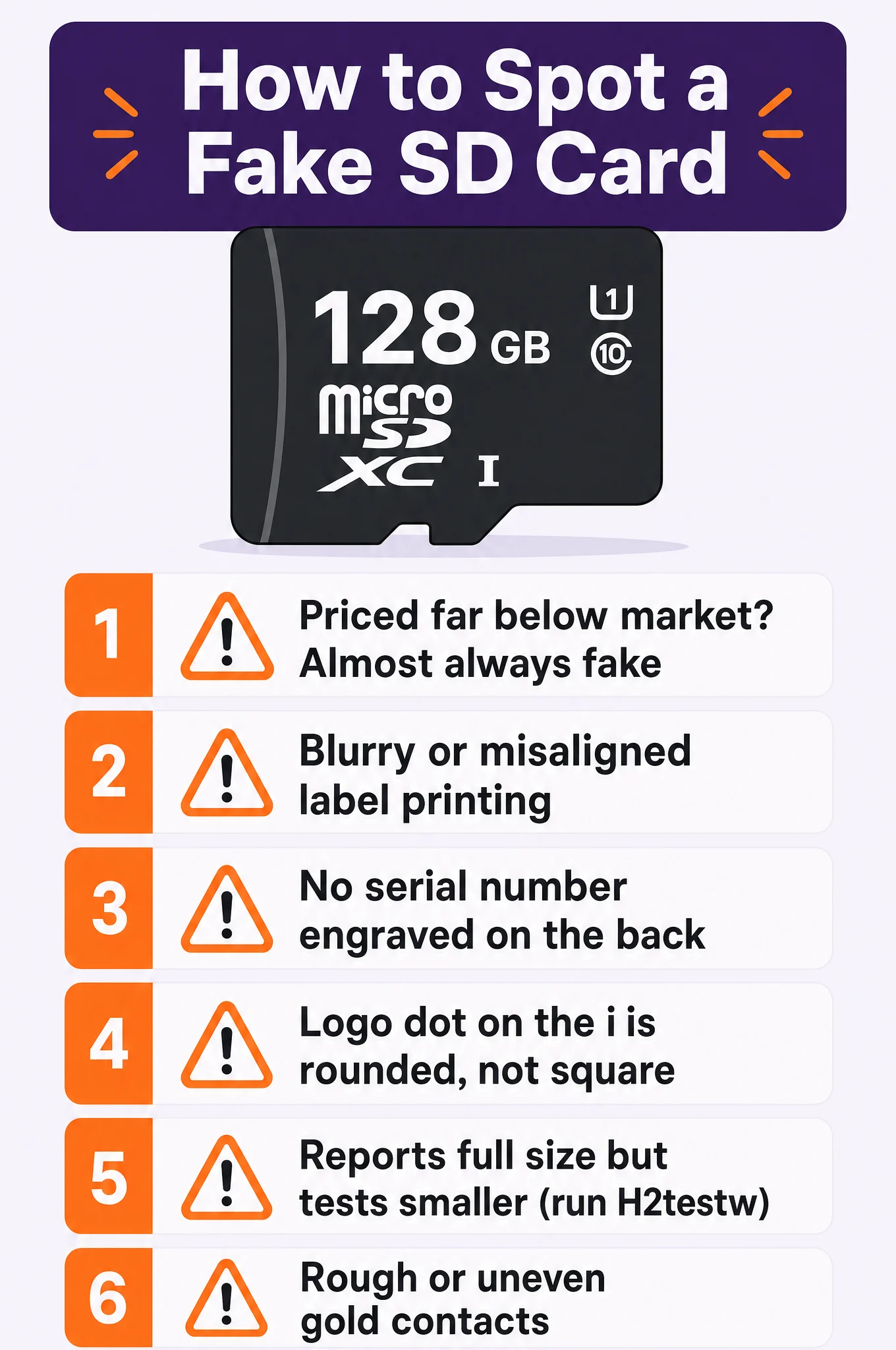
  • Counterfeit cards are common on third-party sellers — stick to Amazon direct or authorized retailers

Kingston Canvas Go! Plus 256GB - DJI's Top Pick

FeatureSpec
Capacity256GB
Speed ClassV30, U3, C10
BusUHS-I
Read Speed170 MB/s
Write Speed90 MB/s
App PerformanceA2
Operating Temp-25°C to 85°C
WarrantyLifetime limited
Pros and Cons
Pros
  • On DJI's official recommended list for the Flip, Mini 5 Pro, Air 3S, and Mavic 4 Pro, so compatibility isn't a guessing game
  • Strong price-to-performance ratio at around $24 for 256GB
  • 90 MB/s write speed comfortably exceeds V30 requirements for 4K recording on any DJI drone
  • Available in 64GB through 512GB so you can match the capacity to your flying habits
  • Lifetime warranty from a brand that's been making memory for decades
Cons
  • Write speed is noticeably slower than the SanDisk Extreme Pro or Samsung PRO Plus
  • Read speed of 170 MB/s means file transfers take a bit longer than faster cards
  • Less widely stocked in physical retail stores compared to SanDisk
  • No endurance rating — not the best pick if you leave the card recording for hours at a time

Lexar Professional 1066x 256GB - Best Write Speed

FeatureSpec
Capacity256GB
Speed ClassV30, U3, C10
BusUHS-I
Read Speed160 MB/s
Write Speed120 MB/s
App PerformanceA2
Operating Temp-25°C to 85°C
WarrantyLimited lifetime
Pros and Cons
Pros
  • 120 MB/s write speed is among the fastest UHS-I cards — gives real headroom for high-bitrate 4K recording
  • On DJI's official recommended list for the Flip, Air 3S, Mini 5 Pro, and Mavic 4 Pro
  • The 1066x speed multiplier holds up well during long, continuous recording sessions
  • Good middle ground between price and performance at around $27 for 256GB
  • Includes a UHS-I adapter in the box for easy transfer to laptops with full-size SD slots
Cons
  • Read speed of 160 MB/s is a step behind SanDisk Extreme Pro and Samsung PRO Plus
  • Lexar changed ownership a few years back and some pilots still question long-term reliability
  • Not as widely available as SanDisk or Samsung — can be harder to find in a pinch
  • No dedicated endurance line from Lexar for continuous-recording use cases

Samsung PRO Plus 256GB - Best Reliability

FeatureSpec
Capacity256GB
Speed ClassV30, U3, C10
BusUHS-I
Read Speed180 MB/s
Write Speed130 MB/s
App PerformanceA2
Operating Temp-25°C to 85°C
Warranty10 years limited
Pros and Cons
Pros
  • Samsung makes its own NAND flash chips, so they control quality from the silicon up
  • 130 MB/s write and 180 MB/s read puts it near the top of UHS-I performance
  • On DJI's recommended list for the Mini 3, Mini 4 Pro, and Mavic 3 Pro
  • 6 types of protection built in: water, temperature, X-ray, magnet, drop, and wear-out proof
  • 10-year limited warranty, and Samsung actually honors it
Cons
  • Slightly more expensive than the Kingston Canvas Go! Plus for similar real-world drone performance
  • Not on DJI's recommended list for the very newest models (Flip, Air 3S) though it works fine
  • The 10-year warranty is shorter than SanDisk's and Kingston's lifetime warranties
  • Samsung's naming can be confusing — make sure you're getting PRO Plus, not EVO Plus or EVO Select

Samsung EVO Plus 256GB - Best Budget

FeatureSpec
Capacity256GB
Speed ClassV30, U3, C10
BusUHS-I
Read Speed160 MB/s
Write Speed120 MB/s
App PerformanceA2
Operating Temp-25°C to 85°C
Warranty10 years limited
Pros and Cons
Pros
  • At around $18 for 256GB it's the cheapest V30-rated card on this list — hard to argue with that value
  • 120 MB/s write speed matches cards costing twice as much
  • On DJI's official recommended list for the Mini 4 Pro, Air 3, Mavic Air 2, and Mavic 3 Pro
  • Same Samsung NAND flash quality as the PRO Plus at a lower price point
  • Available up to 512GB at prices that still feel reasonable
Cons
  • Read speed of 160 MB/s is slower than the Extreme Pro or PRO Plus for file transfers
  • Doesn't have the extra durability features of the PRO Plus line
  • The blue card color looks similar to older, slower Samsung cards — easy to mix up in your kit
  • 10-year warranty instead of lifetime, though that's still plenty for most pilots

SanDisk High Endurance 256GB - Best for Longevity

FeatureSpec
Capacity256GB
Speed ClassV30, U3, C10
BusUHS-I
Read Speed100 MB/s
Write Speed40 MB/s
EnduranceUp to 20,000 hours
Operating Temp-25°C to 85°C
Warranty2 years limited
Pros and Cons
Pros
  • Rated for 20,000 hours of continuous recording, so the flash cells won't wear out before the drone does
  • On DJI's recommended list for the Mavic 3, Mavic 3 Classic, Air 3, and Mini 3 Pro
  • If you fly daily and record every flight, this card will outlast a standard microSD by years
  • V30 rating meets the sustained write speed requirements for all DJI 4K drones
  • Ideal as a dedicated drone card that stays in the slot permanently
Cons
  • Read speed of 100 MB/s is the slowest on this list — file transfers to your computer take noticeably longer
  • Write speed of 40 MB/s barely clears V30 requirements with little headroom for high-bitrate modes
  • No A2 app performance rating
  • Only a 2-year warranty despite the endurance marketing — shorter than every other card here
  • Not worth the premium unless you're actually recording thousands of hours

SanDisk Extreme 256GB - Best All-Rounder

FeatureSpec
Capacity256GB
Speed ClassV30, U3, C10
BusUHS-I
Read Speed190 MB/s
Write Speed130 MB/s
App PerformanceA2
Operating Temp-25°C to 85°C
WarrantyLifetime limited
Pros and Cons
Pros
  • 190 MB/s reads and 130 MB/s writes for around $22. That's the price-to-performance ratio every other card here is measured against
  • On DJI's recommended list for a huge range of models from the Mini 3 to the Mavic 3 Classic
  • The most widely used drone SD card there is — years of real-world proof from millions of pilots
  • A2 rating and lifetime warranty match the more expensive Extreme Pro
  • Available up to 1TB for pilots who want maximum capacity
Cons
  • Performance is so close to the Extreme Pro that you might wonder why the Pro exists
  • Write speed of 130 MB/s is slightly below the Extreme Pro's 140 MB/s — a gap you'll never notice in practice
  • Gold-and-red color scheme makes it look identical to older, slower Extreme cards with different specs
  • Counterfeits are everywhere — buy from Amazon direct or verified retailers only

Kingston Canvas React Plus 256GB - Fastest File Transfer

FeatureSpec
Capacity256GB
Speed ClassV60, U3, C10
BusUHS-II
Read Speed285 MB/s
Write Speed165 MB/s
App PerformanceA2
Operating Temp-25°C to 85°C
WarrantyLifetime limited
Pros and Cons
Pros
  • 285 MB/s read speed cuts a full 256GB card transfer from the better part of an hour down to minutes
  • 165 MB/s write speed is the fastest on this list — maximum headroom for any recording mode DJI throws at it
  • V60 rating guarantees 60 MB/s sustained writes, double the V30 minimum most cards offer
  • On DJI's recommended list for the Mini 4 Pro, Air 3, and Avata 2
  • UHS-II backward compatible — works in all UHS-I drone slots, just at UHS-I speeds during recording
Cons
  • At $50 for 256GB you're paying more than double the Samsung EVO Plus for speed you only see on your computer, not in the air
  • You need a UHS-II card reader to actually get the 285 MB/s transfer speeds — a UHS-I reader bottlenecks it
  • Most DJI drones have UHS-I card slots, so the faster write speeds don't help during actual recording
  • The speed premium only pays off if you regularly transfer large amounts of footage and value your time
  • Overkill for casual flyers who only record a few minutes per session

How We Chose the Best SD Cards for DJI Drones

SD card marketing is full of inflated numbers. The read speed printed on the package is the theoretical maximum under ideal conditions, not what the card does when your drone is recording 4K video in 35-degree heat at 400 feet. We focused on what matters for drone use:

  • DJI's official compatibility. DJI tests specific card models with each drone and publishes the results. A card on DJI's recommended list has been verified to work. A card not on the list might work, might not, and DJI won't help you troubleshoot it.
  • Sustained write speed. The V30 rating guarantees 30 MB/s sustained writes. Some cards exceed this by a wide margin (the Kingston Canvas React Plus sustains 60 MB/s). More headroom means less risk of dropped frames during high-bitrate recording modes.
  • Real-world reliability. We read through hundreds of posts on MavicPilots, DJI forums, and r/dji to find which cards pilots actually use without issues. Cards that pop up repeatedly in "my card failed" threads got cut.
  • Price per gigabyte at 256GB. We standardized on 256GB because it's the sweet spot for most drone owners. It holds roughly 5 hours of 4K/30fps footage on a Mini 4 Pro, which is well beyond what any battery cycle allows. Prices range from $18 to $50.

Which SD Card Does Your DJI Drone Need?

Not every DJI drone has the same requirements, and two of the most popular ones don't use SD cards at all. Here's the compatibility breakdown for every current DJI drone in our database.

DroneSD Card SlotInternal StorageMin SpeedMax Capacity
DJI Mavic 4 PromicroSDYesV30 / U31TB
DJI Air 3SmicroSD42GBV30 / U3512GB
DJI Mini 5 PromicroSD42GBV30 / U31TB
DJI Mini 4 PromicroSD2GBV30 / U3512GB
DJI FlipmicroSD2GBV30 / U3512GB
DJI Mini 3microSDNoneV30 / U3512GB
DJI Mini 4KmicroSDNoneU3256GB
DJI Mavic 3 EnterprisemicroSD8GBV30 / U3512GB
DJI NeoNone22GB, ,
DJI Neo 2None49GB, ,

The pattern is clear: anything with a camera sensor larger than the Neo's needs an SD card for serious use. The Mini 5 Pro and Air 3S have generous 42GB internal storage as a safety net, but you'll still want a card for longer sessions. The Mini 3 and Mini 4K have no internal storage at all, forget your card and you're flying blind.

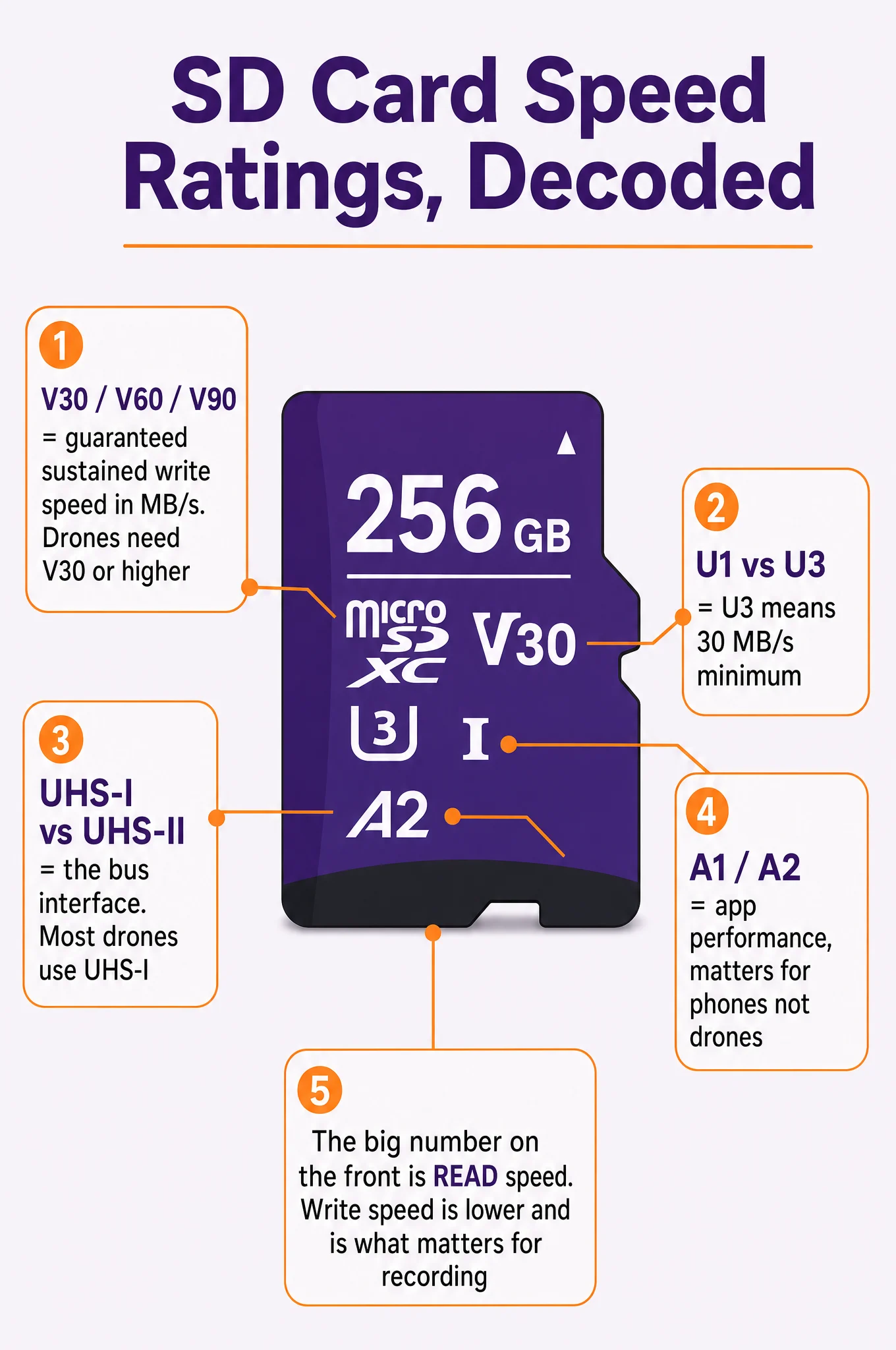
Understanding SD Card Speed Ratings

SD card packaging is covered in logos, numbers, and ratings that look important but can be confusing. Here's what each one actually means for drone use.

Speed Class (V30, V60, V90)

The V number is the minimum sustained write speed in MB/s. V30 means the card will write at least 30 MB/s continuously. Every DJI drone that takes an SD card requires V30 minimum. V60 and V90 cards exceed this requirement and give extra headroom, but most DJI drones have UHS-I interfaces that cap the bus speed anyway.

UHS Speed Class (U1, U3)

U3 means a minimum sustained write speed of 30 MB/s, functionally the same as V30 for drone purposes. U1 means 10 MB/s, which is too slow for 4K recording. All cards on this list are U3.

Bus Interface (UHS-I vs. UHS-II)

This is the physical interface between the card and the drone. UHS-I supports up to 104 MB/s bus speed. UHS-II supports up to 312 MB/s. Most DJI drones use UHS-I slots, which means a UHS-II card like the Kingston Canvas React Plus won't record any faster in your drone, but it will transfer files faster when you plug it into a UHS-II card reader on your computer.

App Performance (A1, A2)

Measures random read/write performance. A2 is better than A1. This rating matters more for phones than drones since drone recording is sequential, not random. But A2 cards tend to be newer and higher quality overall.

Read Speed vs. Write Speed

The big number on the front of the package is always the read speed. Read speed determines how fast you can copy files from the card to your computer. Write speed determines how fast the card records data. For drones, write speed is the critical number, and it's always lower than read speed. A card that reads at 200 MB/s might only write at 90 MB/s.

How Much Storage Do You Actually Need?

The answer depends on what you fly and how you shoot. Here's roughly what 256GB gets you across different DJI drones:

DroneRecording Mode~Minutes on 256GB
DJI Mini 4K4K/30fps~340 min
DJI Mini 34K/30fps HDR~280 min
DJI Mini 4 Pro4K/60fps~190 min
DJI Flip4K/60fps HDR~170 min
DJI Air 3S4K/60fps~180 min
DJI Mini 5 Pro4K/60fps~180 min
DJI Mavic 4 Pro4K/120fps~100 min

Even the Mavic 4 Pro at its highest bitrate gives over an hour and a half on a 256GB card. Since most pilots fly 20-30 minute sessions limited by battery life, 256GB covers multiple flights without formatting. That's why we recommend 256GB as the default capacity.

If you fly the Mini 4K or Mini 3, 128GB is perfectly adequate and saves a few dollars. If you shoot a lot of 4K/120fps on the Mavic 4 Pro, consider 512GB so you're never forced to delete footage in the field.

Our Verdict: Best SD Cards for DJI Drones in 2026

SanDisk Extreme, Best Overall Pick

At $22 for 256GB, the SanDisk Extreme is the card we keep putting in every DJI drone we test. The 190 MB/s read speed is fast enough for quick file transfers, the 130 MB/s write speed gives serious headroom above V30 requirements, and it's on DJI's recommended list for more drone models than any other card.

The Extreme Pro costs $10 more for slightly faster speeds you won't notice during actual flight. Unless you're transferring terabytes of footage regularly, save the money and buy the Extreme. It's the card most drone pilots end up using, and there's nothing wrong with following the crowd here.

Kingston Canvas Go! Plus, Best for New DJI Drones

At $24, the Canvas Go! Plus is on DJI's recommended list for all four of their newest drones: the Flip, Mini 5 Pro, Air 3S, and Mavic 4 Pro. DJI tested it with their latest hardware and gave it the thumbs up.

The write speed of 90 MB/s is lower than the SanDisk Extreme's 130 MB/s, but it still exceeds V30 requirements by three times over. You'd never know the difference during recording. Kingston has been making memory for decades and backs this with a lifetime warranty.

Samsung EVO Plus, Best Budget Pick

At $18 for 256GB, the EVO Plus is the cheapest card on this list that we'd actually trust with drone footage. Samsung makes its own NAND flash, which gives them more quality control than brands that buy components from third parties.

The 120 MB/s write speed matches the Lexar 1066x at two-thirds the price. It's on DJI's recommended list for the Mini 4 Pro, Air 3, and Mavic 3 Pro. If you're buying SD cards for multiple drones or want a spare in your bag, the EVO Plus is the value play.

Samsung PRO Plus, Best Reliability

At $28, the PRO Plus is Samsung's premium line with 6-proof protection: water, temperature, X-ray, magnet, drop, and wear-out. The 130 MB/s write speed and 180 MB/s read speed put it near the top of UHS-I performance.

The 10-year warranty is the longest explicit warranty here. SanDisk and Kingston offer "lifetime limited" warranties that vary by region. Samsung just says 10 years and means it. If you want the card least likely to fail in harsh conditions, this is the one.

Kingston Canvas React Plus, Best for Fast Transfers

At $50, the Canvas React Plus is the only UHS-II card on this list. The 285 MB/s read speed is nearly double any other card here, which matters when you're offloading 256GB of 4K footage to your laptop.

The catch: most DJI drones have UHS-I card slots, so the faster write speed won't help during recording. You need a UHS-II card reader to unlock the transfer speed advantage. If you shoot a lot of footage on the Mavic 4 Pro and value fast turnaround, the investment pays for itself. For everyone else, a UHS-I card works just as well in the drone.

Lexar Professional 1066x, Best Write Speed

At $27, the 1066x offers 120 MB/s sustained writes and sits on DJI's recommended list for the Flip, Air 3S, Mini 5 Pro, and Mavic 4 Pro. The "1066x" speed multiplier translates to consistent performance under load.

Lexar changed ownership a few years back, and some long-time pilots still prefer SanDisk or Samsung out of habit. But the current Lexar cards have been reliable, and the included SD adapter is a nice touch if your laptop has a full-size slot.

SanDisk Extreme Pro, Best Premium UHS-I

At $32, the Extreme Pro is the fastest UHS-I card here: 200 MB/s reads, 140 MB/s writes. If you want the absolute best read speed without jumping to UHS-II, this is it.

Honestly, the gap between the Extreme ($22) and Extreme Pro ($32) is hard to justify for drone use. The 10 MB/s write speed difference doesn't affect recording, and the 10 MB/s read speed difference saves about 5 seconds per gigabyte transferred. Get this if you want the best and don't mind paying for it.

SanDisk High Endurance, Best for Heavy Users

At $28, the High Endurance is designed for 20,000 hours of continuous recording. The NAND cells are built to handle far more write cycles than standard cards, which matters if you fly and record daily.

The trade-off is speed: 100 MB/s read and 40 MB/s write are the slowest on this list. File transfers take noticeably longer, and the write speed barely clears V30 requirements. For most pilots, a standard card will last years before wearing out. The High Endurance is for the small percentage who truly log thousands of recording hours and want a card they can trust not to wear out.

FAQ

All DJI drones that accept SD cards require at least a V30 / U3 rated microSD card. This guarantees a sustained write speed of 30 MB/s, which is the minimum for recording 4K video. Every card on this list meets or exceeds this requirement.

The DJI Mini 5 Pro and Mavic 4 Pro officially support up to 1TB microSD cards. The Mini 4 Pro, Flip, Air 3S, and Mini 3 support up to 512GB. The Mini 4K supports up to 256GB. Always check your specific drone's specs before buying a card larger than 256GB.

No. The DJI Neo has 22GB of internal storage and the Neo 2 has 49GB. Neither drone has a microSD card slot. You transfer footage via the DJI Fly app or USB-C connection.

Not during recording. Most DJI drones have UHS-I card slots, which cap the bus speed at 104 MB/s regardless of the card. A UHS-II card like the Kingston Canvas React Plus will work perfectly in a UHS-I slot, but it won't record any faster. The UHS-II advantage shows up when transferring files to a computer with a UHS-II card reader.

Format the card inside the drone using the DJI Fly app or the DJI RC controller. Go to the camera settings and select Format SD Card. This ensures the card uses the correct file system (exFAT for cards 64GB and larger). Avoid formatting on a computer unless you specifically choose exFAT, some computers default to NTFS or FAT32 which can cause issues.

The most common causes are: the card isn't V30/U3 rated, the card exceeds the drone's maximum supported capacity, the card is formatted incorrectly (needs exFAT), or the card is counterfeit. Try reformatting the card in the drone first. If that doesn't work, try a different card from DJI's recommended list. Counterfeit SanDisk cards are extremely common on Amazon from third-party sellers.

A 256GB card holds roughly 5-6 hours of 4K/30fps footage or 3 hours of 4K/60fps footage, depending on the drone and bitrate. Since most DJI batteries last 25-35 minutes, that's 8-12 full battery cycles before the card fills up. Most recreational pilots can go weeks between formatting.

For short flights, no, the DJI Mini 5 Pro and Air 3S both have 42GB of internal storage, enough for about an hour of 4K/30fps recording. But internal storage fills up fast in higher quality modes, and transferring files from internal storage is slower than swapping an SD card. A microSD card is still recommended for any serious flying.

Paul Posea

Paul Posea

Author · Dronesgator

Paul Posea is the founder of Dronesgator and has been reviewing and comparing drones since 2015. With a Part 107 certification, 195 YouTube drone reviews, and published work on Digital Photography School, he combines hands-on flight testing with data-driven analysis to help pilots find the right drone.