• Find My Drone

How to Find a Lost Drone: 7 Methods That Actually Work

Updated

By Paul Posea

How to Find a Lost Drone: 7 Methods That Actually Work - drone reviews and comparison

Immediate Actions After Losing a Drone

Stay Put and Keep the Controller On

The single most important action after losing signal is to stay exactly where you are. Your current position is the drone's registered Home Point from takeoff. If return-to-home activates, the drone navigates back to that location. Moving even 50 meters can cause the drone to fly toward your old position while you are searching in the wrong direction.

Keep the controller powered on. If the drone regained altitude or drifted back into range, the signal can reconnect automatically. Many pilots have recovered a drone this way: signal drops, they wait 30 to 60 seconds without moving, and the video feed returns. Do not turn the controller off until you have confirmed the drone is physically in hand.

Stay at your takeoff point. Keep the controller on. Do not move for at least 5 minutes after signal loss before starting a ground search.

Check the DJI Fly Screen Before Moving

DJI Fly continues logging GPS data even after video feed loss. Before doing anything else, check the app screen for:

  • Drone position pin: The last recorded GPS coordinates shown on the map view. Tap the map icon in DJI Fly's lower left corner.
  • Last camera frame: The final image captured before disconnection. This shows the terrain, landmarks, or canopy directly below or in front of the drone at the moment of loss.
  • Remaining battery indicator: Shows estimated battery at last contact. Low battery at loss means the drone may have landed itself via low-battery RTH rather than flying further.
  • Altitude at loss: If the drone was at low altitude, it likely landed within the signal-loss radius rather than continuing to fly.

Trigger Remote LED Flash and Beeper

If the drone still has battery and the app shows it connected, use DJI Fly's Find My Drone tool before any ground search. In DJI Fly: Profile (lower right), then Find My Drone, or Camera View, three-dot menu, Safety, Find My Drone. The tool lets you trigger the drone's LED lights to flash and its beeper to sound. A drone beeping in tall grass or light brush can be heard from over 50 meters on a calm day, which often makes the ground search unnecessary.

How to Find a Lost Drone with DJI Find My Drone

What Find My Drone Shows

DJI Find My Drone is available in DJI Fly on all current models: Mini 4 Pro, Air 3S, Mavic 4 Pro, Neo, Flip, Mini 5 Pro, and most models back to the Mini SE and Mavic Mini. For older DJI GO 4 models (Phantom 4 Pro, Mavic 2 series), the same feature is available in the GO 4 app.

The feature displays a map showing your current GPS position alongside the drone's last recorded position. The map offers standard, satellite, and mixed views. In satellite view, you can often identify the specific tree cluster, rooftop, or terrain feature where the drone is likely resting. The last camera frame is shown alongside the coordinates to help identify the landing zone visually.

Using the Coordinates to Navigate

Copy the drone's last-known coordinates from DJI Fly and drop them as a pin in Google Maps or Apple Maps. Navigate to that pin on foot. The coordinates reflect the drone's last GPS fix, which may be slightly offset from the actual landing point depending on altitude at loss and any distance traveled after signal dropped. Expect to search within a 20 to 50 meter radius of the pin.

Tip: DJI Find My Drone shows the last camera frame alongside the coordinates. Look at the image for identifiable features: a distinctive tree, a trail, a fence line, or a rooftop. These landmarks are more actionable than coordinates when you are on the ground searching.

The June 2024 Flight Record Sync Change for US Users

As of June 2024, DJI discontinued automatic flight record syncing to the cloud for US users. US pilots must manually sync or export their flight records in DJI Fly before submitting a DJI Care Refresh flyaway claim. If you are attempting a Care Refresh claim, export the flight record from DJI Fly (Profile, Flight Records, select the flight, export) before the app loses access to that session. Without the exported log, the claim may be denied.

Note: WiFi-only drones (no GPS). Budget drones like the Ryze Tello and sub-$100 Holy Stone models do not have GPS, no RTH, and no Find My Drone function. Recovery depends entirely on line-of-sight tracking at the moment of loss: note the direction of travel and last visible position, then search that area on foot. The signal radius is typically 30 to 100 meters from the controller, so a WiFi-only drone is unlikely to be far from where you last saw it.

Flight Log Analysis and AirData for Finding a Lost Drone

GPS and Bluetooth drone tracker types for finding a lost drone
When the in-app tools give an approximate last-known position, flight log analysis and GPS trackers narrow the search area to a specific point.

Reading the DJI Fly Local Flight Log

DJI Fly stores detailed flight logs locally on your phone even when cloud sync is off. Each log includes GPS track with latitude, longitude, altitude, speed, heading, and battery level at every second of the flight. Open DJI Fly, tap Profile, then Flight Records, then select the most recent flight. The full flight path is displayed on a map, and you can see the final recorded position plus the heading and altitude just before signal loss.

The heading at loss is particularly useful: if the drone was at 80 meters altitude traveling northeast at 5 m/s when it went dark, and the battery had 6 minutes remaining, you can calculate a rough maximum drift zone of approximately 1 to 2 km northeast of the last position. This narrows a search from a general area to a specific direction.

AirData for Detailed Telemetry

AirData is a third-party flight data platform that syncs with DJI Fly logs and provides a detailed visualization of the full flight path including the final seconds before signal loss. It can display last-recorded heading, speed, altitude, and battery level in a more readable format than the DJI Fly log view. If you already have AirData linked to your DJI account, the flight log will have synced automatically. If not, you can manually upload the log file after exporting from DJI Fly.

When the Drone Had No GPS Lock

If the drone lost GPS lock before the flyaway (low satellite count, flying under tree canopy), Find My Drone may not have accurate last-known coordinates. In this case, the last heading and speed from the flight log are the best available data. Calculate probable landing zone using speed x time x heading from the last telemetry point. Use the last camera frame as a terrain reference to identify the likely landing area visually.

Physical Search Tactics for a Lost Drone

Grid Pattern Walk

Once you have navigated to the last-known coordinates, stop and listen before beginning a search walk. On a calm day, a drone with remaining battery and a beeper active can be heard from 50 to 100 meters in open terrain. If the battery is dead, the drone will be silent, but propellers catching on branches or brush may create faint movement in wind.

Walk in a systematic grid pattern outward from the coordinates: a series of parallel lines spaced 5 to 10 meters apart, covering a 50-meter radius first, then expanding. Bring a second person if possible. One person calls out landmarks while the other uses the satellite map view to mark searched areas.

Use a Second Drone to Search

If you have access to a second drone, scanning treetops and tall grass from above is faster than walking. Fly the second drone at low altitude (15 to 30 meters) over the search area with the camera looking straight down. The lost drone's white or grey body is visible against green vegetation in many conditions. This approach is especially useful for tall grass fields where ground visibility is limited to a few meters.

Tip: At night, trigger DJI Find My Drone's LED flash function. The white strobe visible from significantly further in low-light conditions than daylight. If you are searching after dark, LED flash is more effective than the beeper.

Searching Trees and High Landings

Drones that lose power at altitude often land in trees. When searching woodland, look upward into the canopy rather than at the ground. The drone's LEDs may still be flashing from a branch if battery remains. Listen for any beeping. If you see a shape in the canopy, use the second drone to confirm before attempting to retrieve it, as dislodging the drone from height without a safety approach can cause additional damage.

Social Media and Community Recovery

Facebook drone groups (DJI Mini Pilots, DJI Drone Owners) and local community groups on Nextdoor and Facebook regularly surface found drones. Post the last-known coordinates, date and time of loss, a photo of the drone model, and your contact information. Include the serial number in your records for ownership verification but do not publish it publicly.

Reddit communities (r/dji, r/drones) are useful for search advice specific to your terrain or flight conditions. Someone familiar with the local area may know about restricted access zones, private property lines, or features not visible on the satellite map.

Tip: Post on Nextdoor for the specific neighborhood where the drone came down. A good Samaritan who found the drone is far more likely to respond to a local community post than a general Facebook group or a flyer on a telephone pole.

GPS Trackers and Preventing Future Lost Drones

Drone buzzer and GPS tracker accessories for finding a lost drone
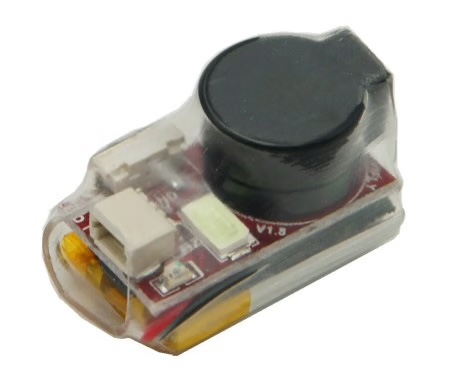
A drone buzzer or GPS tracker attached before high-risk flights can reduce a search from hours to minutes. Both options are covered in the Best Drone Trackers guide.

GPS Tracker Options for Drones

For regular flights over dense terrain, water, or long distances, a dedicated GPS tracker gives you real-time coordinates independent of DJI's Find My Drone feature. Options include cellular trackers like the Trackimo 4G GPS, which updates location every 60 seconds via cellular network and works anywhere with cell coverage. Bluetooth finders like the Apple AirTag (with appropriate mount) work within Bluetooth range and are better suited for nearby searches in populated areas.

The Vifly Finder 2 is a dedicated drone buzzer: 100 dB alarm triggered automatically when the drone is stationary for 10 seconds (crash-detected landing). It adds 4 grams and provides an audible beacon that is audible up to 100 meters in open terrain. The buzzer approach is lower cost and lower tech than GPS tracking but requires you to be in physical proximity to hear it.

DJI Flyaway Registration Service

If the drone is unrecoverable, DJI offers a Flyaway Registration service at support.dji.com. Submitting the serial number and incident report flags the drone as a flyaway in DJI's system. This restricts the drone from being activated by anyone who finds it and generates documentation for insurance and Care Refresh claims. Eligible models include all current DJI consumer drones. DJI responds within 5 to 10 business days.

Prevention: Stop the Next Flyaway

  • Always wait for 8 or more GPS satellites before taking off. The satellite count is shown in the top of the DJI Fly camera view.
  • Set RTH altitude above the tallest obstacle between you and the launch point, not just the default 30 meters.
  • Test RTH in an open field before flying in a complex environment with trees, buildings, or powerlines.
  • Label the drone body with your name and phone number. Recovery by a good Samaritan is more likely if there is contact information.
  • Attach a GPS tracker or buzzer for flights over water, tall grass, forest, or any terrain where visual recovery would be difficult.
  • Keep firmware current. Outdated firmware has caused flyaways on several DJI models that were resolved in subsequent updates.

FAQ

Open DJI Fly and check the map for the last recorded drone position before signal loss. Tap Find My Drone (Profile, then Find My Drone) to trigger LED flash and beeper if battery remains. Navigate to the last-known coordinates using the pin in Google Maps. Use the last camera frame shown in Find My Drone to identify terrain features at the landing zone.

DJI Find My Drone is a feature in the DJI Fly app that shows the last recorded GPS coordinates and final camera frame before signal loss. It also lets you remotely trigger LED flashing and a beeper on the drone if it still has battery. It is accessible via Profile in the DJI Fly home screen or through the three-dot menu, Safety, Find My Drone during a flight.

Stay exactly at your takeoff position, which is the drone's Home Point for RTH. Keep the controller powered on. Check DJI Fly for the last-known coordinates and remaining battery level. Trigger the LED flash and beeper via Find My Drone if the drone still shows as connected. Do not move from the launch point for at least 5 minutes, as signal can reconnect if the drone drifts back into range.

It depends on altitude and battery remaining at the time of signal loss. A drone at 100 meters altitude traveling at 30 km/h with 3 minutes of battery remaining could be within a 1.5 km radius of the last GPS pin. Check the flight log in DJI Fly for the last recorded heading, speed, and battery level to estimate the search radius and direction.

An Apple AirTag works within Bluetooth range (up to about 100 meters) and through the Find My network in populated areas where other Apple devices can relay the signal. It is useful for locating a drone in a neighborhood or near roads where other Apple devices are present. In remote or rural areas, a cellular GPS tracker like the Trackimo 4G provides real-time coordinates anywhere with cell coverage, making it more reliable for backcountry flights.

Yes. DJI Care Refresh includes flyaway coverage for drones that are unrecoverable. You need to provide a flight log showing the drone's last known position and circumstances of loss. As of June 2024, US users must manually export their flight records from DJI Fly rather than relying on automatic cloud sync. Export the flight record (Profile, Flight Records, export) before attempting any recovery action.

Navigate to the last-known coordinates and search within a 20 to 50 meter radius. Use the last camera frame from DJI Find My Drone to identify terrain features. Walk a grid pattern and look upward into trees as well as across the ground. Bring a second person or use a second drone to scan from above. Check the full flight log in DJI Fly for the last recorded heading and speed to estimate which direction the drone traveled after GPS was lost.

Wait for 8 or more GPS satellites before takeoff. Set RTH altitude well above the tallest nearby obstacle. Test RTH in open space before flying in complex environments. Label the drone with contact information. Attach a GPS tracker or drone buzzer (such as the Vifly Finder 2) for high-risk flights over water, forest, or tall grass. Keep firmware current, as outdated firmware has been linked to flyaway incidents on several DJI models.

Paul Posea

Paul Posea

Author · Dronesgator

Paul Posea is the founder of Dronesgator and has been reviewing and comparing drones since 2015. With a Part 107 certification, 195 YouTube drone reviews, and published work on Digital Photography School, he combines hands-on flight testing with data-driven analysis to help pilots find the right drone.