• Find My Drone

How to Fix Gimbal Overload on a Drone: 8 Fixes

Updated

By Paul Posea

How to Fix Gimbal Overload on a Drone: 8 Fixes - drone reviews and comparison

What Causes Gimbal Overload on a Drone

DJI drone gimbal overload error fix
Gimbal overload error code 30064 appears in DJI Fly when the gimbal motor detects abnormal resistance during its startup sweep or mid-flight.

Error Code 30064: What It Means

DJI Fly logs gimbal overload events as error code 30064. The error appears when the gimbal motor draws more current than expected to reach or hold a commanded position. The controller interprets this as a physical blockage or motor failure and stops the motor to prevent burnout.

The gimbal runs a self-test sweep every time the drone powers on. It tilts through its full range of motion to check that the mechanism is clear and calibration is valid. Any resistance during this sweep triggers the overload. This is why the error often appears immediately on power-on rather than mid-flight.

Three Scenarios That Cause Gimbal Overload

The cause is almost always one of these three, depending on when the error appeared:

  • First flight or new-in-box: Packaging foam or gimbal clamp still attached. The hidden black foam behind the gimbal housing (separate from the chin foam) is the most commonly missed piece.
  • After a crash or impact: Physical damage to the gimbal arm, torn ribbon cable, dislodged vibration dampers, or on DJI Neo specifically, the gimbal sled popped out of the exoskeleton.
  • Random mid-use error: Debris accumulation in the gimbal mechanism, third-party accessories blocking range of motion, firmware issue, or beginning motor wear.

Models Most Commonly Affected

The gimbal overload error shows up across the DJI lineup but is most frequently reported on the Air 2S, Mini 3 Pro, Mini 4 Pro, and Mavic 3. The DJI Neo has a unique design that creates a specific post-crash failure mode covered below.

Fix Gimbal Overload on a New Drone: First Flight Issues

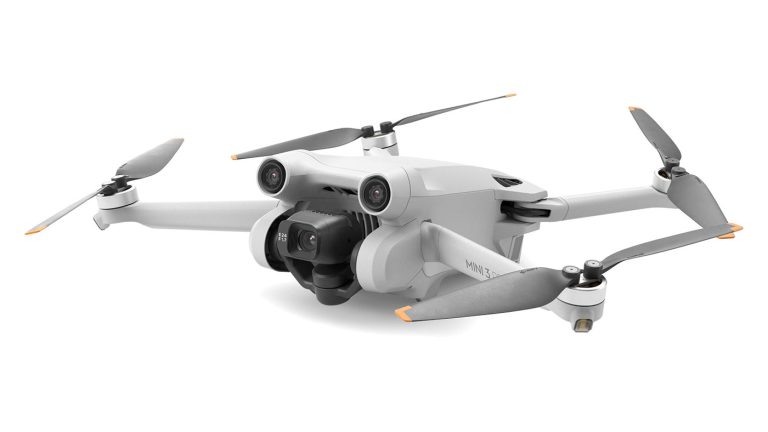
DJI Mini 3 Pro gimbal with cover removed
Remove the gimbal clamp, chin foam, and any hidden foam behind the gimbal housing before the first power-on. Missing the hidden foam is the most common first-flight gimbal overload cause.

Step 1: Remove All Packaging

Power off the drone completely if it is already on. Remove the gimbal in this order:

  1. Remove the plastic gimbal clamp (if present): unclip from the front and slide off.
  2. Remove the chin foam: the larger visible foam piece under the camera.
  3. Look behind the camera housing: there is often a smaller piece of black foam tucked between the gimbal and the drone body that is easy to miss. Remove it.
  4. For DJI Phantom: remove both the plastic gimbal clamp AND the separate white foam stopper behind the camera. Both must be removed.

With all packaging removed, power the drone back on and let the gimbal complete its initialization sweep without touching the drone. Place it on a flat, clear surface during this process.

Step 2: Clear the Launch Surface

Powering on with the drone tilted more than about 30 degrees, or sitting in long grass or gravel that contacts the gimbal, can cause the initialization sweep to hit an obstacle. Use a flat hard surface: pavement, a table, or a landing pad. Keep the area around the gimbal clear for at least 5 cm in all directions.

Tip: After removing all foam and placing the drone on a flat surface, power on and do not touch the drone for 20 to 30 seconds. Let the gimbal complete its full initialization sweep before picking it up or connecting the controller.

Fix Gimbal Overload After a Crash

The DJI Neo Sled Fix (30 Seconds)

The DJI Neo uses a design where the gimbal sled (the inner black unit) sits inside a grey exoskeleton frame. On impact, the sled pops out of the exoskeleton. This is by design: the sled is meant to detach rather than break. The fix is to press the sled firmly back into the frame until it clicks into place. No tools needed. This resolves the nodding camera or gimbal overload error that appears after any Neo crash.

Inspect Gimbal Dampers and Ribbon Cable

After any crash that was hard enough to concern you, inspect two components before flying again:

Vibration dampers: Small rubber mounts isolate the gimbal from motor vibration. On most DJI drones they are visible as small balls or cylindrical mounts connecting the gimbal plate to the drone body. A torn damper causes the gimbal to sit at a slight angle and fight against its calibrated position, triggering overload under load. Replacement dampers cost a few dollars and are available for every DJI model.

Gimbal ribbon cable: The flat flex cable connecting the gimbal assembly to the flight controller is the most common hardware cause of persistent gimbal overload after a crash. Look for creases, tears, or burn marks. The cable is thin and fragile. Replacements cost $5 to $20 on Amazon or AliExpress and dozens of model-specific repair tutorials exist on YouTube. Many forum users confirm ribbon cable replacement as the fix after all other steps fail.

Note: If the gimbal arm itself is visibly bent, or if the gimbal motor makes a grinding sound, the repair is beyond a cable swap. Submit a DJI Care Refresh claim or contact DJI's repair service.

Software Fixes for Gimbal Overload

Step 5: Gimbal Auto-Calibration in DJI Fly

The in-app gimbal calibration resets the gimbal's reference positions and clears false overload signals caused by calibration data drift. To run it:

  1. Connect the drone and open the camera view in DJI Fly.
  2. Tap the three-dot menu in the upper right corner.
  3. Select Control, then scroll to find Gimbal Calibration.
  4. Tap Auto Calibration and place the drone on a flat, hard surface.
  5. Wait for the calibration to complete (usually 30 to 60 seconds).

In DJI GO 4 (for older models): tap the gimbal icon in the three-dot menu and scroll to Gimbal Auto Calibration.

Step 6: IMU Calibration

IMU calibration is separate from gimbal calibration, but forum users and repair guides consistently confirm that running IMU calibration after gimbal calibration resolves overload errors that persist through gimbal calibration alone. The IMU and gimbal share calibration reference data; an offset in the IMU can affect the gimbal's sense of its neutral position.

To calibrate the IMU: DJI Fly app, three-dot menu, Safety tab, IMU Calibration. Follow the on-screen rotation steps with the drone on a flat, level surface.

Step 7: Update Firmware via DJI Assistant 2

Over-the-air firmware updates through DJI Fly can result in partial updates if the connection drops mid-process. A partially applied update can corrupt the gimbal control firmware and produce false overload signals. Use DJI Assistant 2 on a Windows or Mac computer for a clean firmware write via USB. Connect the drone directly (battery fully charged, USB-C cable), log in to your DJI account, select the drone, and apply the update from the desktop app.

Third-party ND filters, lens hoods, and aftermarket accessories can physically block the gimbal's range of motion. Remove all accessories and test with a bare camera before running any calibration.

When Gimbal Overload Means Hardware Replacement

Signs the Gimbal Motor Is Burned Out

A burned-out gimbal motor is the end state after prolonged overload events or after a hard crash. Signs that distinguish motor failure from fixable causes:

  • The gimbal makes no movement at all on power-on, not even an attempt at initialization
  • A grinding or clicking sound comes from the gimbal housing during power-on
  • The error persists after ribbon cable replacement, calibration, and firmware reinstall
  • The error is intermittent: sometimes works, sometimes doesn't, with no change in conditions

A burned-out motor requires either a gimbal replacement unit or a motor swap at the component level. DJI's repair service typically sends a refurbished aircraft and recycles the damaged one through DJI Care Refresh. Out-of-warranty repair costs vary by model: approximately $80 to $200 for gimbal assembly replacement.

Prevention: How to Avoid Gimbal Overload Errors

Most overload errors are preventable:

  • Always remove the gimbal guard before powering on, every flight, every time
  • Never power on with the drone tilted more than 30 degrees or resting on uneven ground
  • Do not launch from long grass, gravel, or sand that can contact the gimbal during initialization
  • Keep third-party accessories within the weight limit specified in the drone manual
  • After any crash, inspect and land for the day rather than immediately attempting another flight
  • Update firmware through the desktop DJI Assistant 2 app rather than OTA when possible

DJI Care Refresh Coverage

Gimbal motor overload damage from crashes is covered under DJI Care Refresh. The plan provides two flyaway replacements and unlimited crash replacements per year (at a per-incident fee). If your drone is within the Care Refresh window, a gimbal replacement is significantly cheaper than out-of-warranty repair. See the DJI Care Refresh guide for plan details and cost comparison.

FAQ

Gimbal overload (DJI error code 30064) means the gimbal motor detected more resistance than expected. The motor stopped to prevent burnout. Common causes are packaging foam still attached, physical debris in the gimbal mechanism, a crash that damaged the gimbal arm or ribbon cable, miscalibration, or a firmware issue. It does not always mean the gimbal is broken.

Remove all packaging materials. This includes the plastic clamp, the chin foam, and any hidden black foam behind the gimbal housing between the camera and the drone body. Place the drone on a flat surface and power on without touching it. Let the gimbal complete its full initialization sweep. This resolves the majority of first-flight overload errors.

The DJI Neo's gimbal sled (inner black unit) pops out of the grey exoskeleton frame on impact. Press the sled firmly back into the frame until it clicks into place. No tools needed. This is a design feature, not damage, and the fix takes about 30 seconds.

Yes, in most cases. Removing packaging, cleaning debris, running gimbal and IMU calibration, updating firmware via DJI Assistant 2, and replacing the ribbon cable are all DIY fixes. The ribbon cable is the most involved but costs $5 to $20 and has model-specific tutorials available. Only a burned-out motor or physically bent gimbal arm requires professional repair.

The gimbal ribbon cable is a flat flexible cable connecting the gimbal assembly to the flight controller. It carries video signal and motor control data. Signs of damage include creases, small tears, or burn marks visible on the cable surface. When this cable fails, the gimbal overload error persists through all software fixes. Replacement cables are available on Amazon and AliExpress for most DJI models.

Yes. DJI Care Refresh covers crash damage including gimbal motor and assembly damage. The plan provides a refurbished replacement unit for a per-incident fee. Without Care Refresh, out-of-warranty gimbal replacement typically costs $80 to $200 depending on model.

Recurring overload after calibration usually points to a physical cause that calibration cannot fix: a partially torn vibration damper holding the gimbal at a slight angle, a damaged ribbon cable that intermittently fails, or a third-party accessory adding weight beyond the gimbal's tolerance. Remove all accessories, inspect the dampers and ribbon cable visually, and run both gimbal and IMU calibration in sequence.

Do not fly with an active gimbal overload error. The gimbal motor has been stopped to prevent damage. Flying without the gimbal functioning means no camera stabilization, and more importantly, if the motor is physically damaged, continuing to power it may cause irreversible burnout. Resolve the error before your next flight.

Paul Posea

Paul Posea

Author · Dronesgator

Paul Posea is the founder of Dronesgator and has been reviewing and comparing drones since 2015. With a Part 107 certification, 195 YouTube drone reviews, and published work on Digital Photography School, he combines hands-on flight testing with data-driven analysis to help pilots find the right drone.