• Find My Drone

What Happens If a Drone Goes Out of Range? RTH Guide

Updated

By Paul Posea

What Happens If a Drone Goes Out of Range? RTH Guide - drone reviews and comparison

What Happens When a Drone Goes Out of Range

When a GPS drone loses the control signal from its remote controller, it does not immediately fall or fly away randomly. GPS drones execute a failsafe sequence designed to bring the aircraft back safely. The exact behavior depends on how the drone is configured, but the default sequence for DJI consumer drones follows a consistent pattern.

The three-stage failsafe sequence

Stage one: the drone detects signal loss and hovers briefly, typically for 3 seconds on RC-controlled aircraft or up to 20 seconds on Wi-Fi-connected aircraft (older DJI models). During this pause, it continuously attempts to re-establish the control link. If signal is restored in this window, you resume normal flight with no interruption.

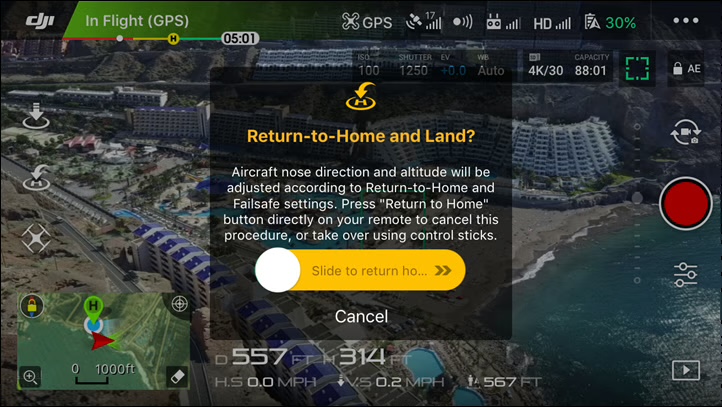
Stage two: if signal is not restored, the drone initiates Failsafe RTH. It ascends to the preset RTH altitude (if currently below it), then flies a straight line back toward the recorded home point at cruise speed. On most DJI models, the drone avoids obstacles during this return flight if obstacle avoidance is enabled and sensors are unobstructed.

Stage three: when the drone reaches the home point GPS coordinates, it descends and lands. If Precision Landing is enabled and the Visual Positioning System can match the landing zone image recorded at takeoff, it touches down within 1-2 meters of the exact takeoff spot. If conditions prevent precise landing (featureless surface, water, darkness), it lands at the GPS coordinates regardless.

What happens without GPS: toy drones and ATTI mode

Toy drones without GPS have no RTH capability. When they lose signal, they typically enter a hover briefly before slowly drifting with any wind present and eventually auto-landing when battery depletes. Some basic models simply cut throttle on signal loss. For GPS drones operating in Attitude mode (ATTI mode, which activates when satellite count drops below 6), the drone holds altitude but loses position lock and drifts laterally in wind. ATTI mode does not trigger RTH.

Note: On DJI drones, the failsafe behavior on signal loss is configurable. Options are: Return to Home (default), Hover, or Land. You can change this under Settings > Safety > Signal Lost in the DJI Fly app.

How Return to Home Works on DJI Drones

DJI drone Return to Home sequence showing the RTH flight path and altitude behavior
Return to Home sends the drone to the recorded home point GPS coordinates at the preset RTH altitude. The home point is recorded at takeoff. Verifying it before flight is the single most important RTH preparation step.

DJI drones support three types of Return to Home, each triggered differently.

How to configure the Signal Lost failsafe behavior

DJI drones default to Return to Home on signal loss, but you can change this. In DJI Fly, tap the three-dot menu icon, select Safety, then scroll to Signal Lost Action. The three options are: Return to Home (default and recommended for most flying), Hover (drone holds position until battery depletes or signal returns, useful when flying close range), and Land (drone descends and lands immediately at its current position). Return to Home is the right setting for any flight where you might push the range. Hover and Land are for controlled indoor or close-range scenarios where RTH is unnecessary.

Failsafe RTH (signal loss)

Triggered automatically when the control link is lost for the threshold duration. This is the failsafe that activates when you fly out of range. It executes the full ascend-navigate-land sequence without any pilot input required.

Low Battery RTH

When the battery level drops to the point where the drone calculates it has just enough power to return and land, a low battery RTH warning appears in the app with a 10-second countdown. You can cancel the countdown and continue flying if you judge you have time to return manually. If battery continues to drop to the critical threshold, the drone initiates an automatic landing with no cancellation option. This is intentional: DJI's system would rather put the drone down in a suboptimal spot than crash from a dead battery.

Smart RTH (manual)

Pressing the RTH button on the remote controller or tapping the RTH icon in the DJI Fly app triggers Smart RTH. The drone executes the same ascend-navigate-land sequence, but you retain the ability to cancel at any time during the return flight by pressing the pause button. Smart RTH is useful for ending a flight efficiently from a distance or when you have become disoriented about the drone's position.

The Precision Landing system

When Precision Landing is enabled (Settings > Safety > Precision Landing), the drone takes a photo of the landing zone at takeoff. On return, it matches the current camera view against that reference image to land within 1-2 meters of the exact takeoff spot. Precision Landing requires Visual Positioning System (VPS) to function and does not work over water, uniform grass, or other textureless surfaces that the VPS cannot differentiate.

RTH Altitude: The Most Important Setting to Configure

RTH altitude is the height the drone climbs to before flying home. Most pilots never change the default. Most flyaway crashes involving obstacles happen because the RTH altitude was too low. This is the most consequential drone safety setting most people leave at its default value.

The default is often wrong

DJI's default RTH altitude is 30 meters (about 100 feet) on many current models. In open farmland, 30 meters clears everything easily. In a suburb with mature trees (15-20 meters) or near buildings, 30 meters may barely clear the obstacles between your drone and its home point. If the drone ascends to 30 meters and then flies straight toward home at that altitude, it may collide with a rooftop or tree line it could have cleared at 50 meters.

Recommended RTH altitude by environment

EnvironmentRecommended RTH AltitudeRationale
Open field, beach, park50m (165 ft)Clears any nearby obstacles with margin
Suburban area with trees and houses80-100m (260-330 ft)Clears typical two-story homes and mature trees
Urban area with buildings100-120m (330-400 ft)Clears most low-rise structures; near FAA ceiling
Hilly or forested terrainMatch terrain awareness or 120mHills can be higher than buildings; use terrain awareness where available

How to set RTH altitude

Open the DJI Fly app, go to Safety settings (the shield icon), and find the RTH Altitude field. Set it to a value above the tallest obstacle between your expected flying location and your home point. Set this before every flight at a new location, not once at home and forgotten. The RTH altitude you set in a backyard is wrong for a city park three miles away.

Tip: A simple rule: look around 360 degrees and estimate the tallest thing you can see within about 500 meters. Set your RTH altitude to that height plus 30 meters of buffer. This takes 10 seconds and prevents a category of flyaway that causes hundreds of drone losses every year.

What to Do If Your Drone Goes Out of Range in the Air

Drone pilot troubleshooting signal loss during a flyaway situation
If your drone loses signal mid-flight, the first priority is staying calm and staying at the takeoff spot. RTH navigates to GPS coordinates, not to your current position.

Losing signal mid-flight is stressful. Most pilots instinctively move toward the drone's last known position. This is the wrong instinct. RTH returns to the home point, which is typically where you took off. Moving away from that spot complicates retrieval and may mean the drone lands somewhere you cannot find it.

Immediate steps

Stay at your takeoff location. The drone will return to that GPS position, not to wherever you are standing when it comes home. Give the RTH sequence time to execute. For a drone a kilometer away at 60 km/h, that takes about a minute. Panicking and making rapid stick inputs when signal is intermittent can override the RTH sequence at the wrong moment.

Raise your controller. Signal range improves when the antenna faces the drone. The flat face of DJI's RC controller antennas transmits and receives best when oriented toward the aircraft, not pointed at the ground. Some pilots find raising the controller and rotating slowly toward the drone's last known position restores signal enough to resume manual control.

If you regain signal during RTH

The drone will continue RTH until you cancel it. Press the pause button (the physical button on DJI RC controllers, or the stop icon in the app) to cancel RTH and take manual control. You can then fly it home yourself or let it continue. Do not press RTH again mid-flight unless you intend to restart the sequence.

Using DJI Find My Drone

If the drone lands somewhere out of sight during RTH or a battery-triggered auto-land, the DJI Fly app includes a Find My Drone feature that shows the last recorded GPS coordinates on a map. This uses the last GPS fix before the link was fully lost and gives you a starting point for a ground search. In most urban and suburban environments, this is accurate to within a few meters.

How to Prevent Drone Flyaways

Most flyaways are preventable. The common causes are misconfigured home points, too-low RTH altitude, insufficient GPS lock before takeoff, and flying in conditions that push the drone beyond its RTH battery reserve. All of these are pre-flight decisions.

The pre-flight checklist that prevents most flyaways

Before every flight at a new location, run through these in order. Charge both the drone battery and the remote controller to 100% and fly within 24 hours of charging. Wait for the app to show 10 or more satellites acquired before taking off. Verify the home point marker on the map is at your feet, not at a previous location. Set RTH altitude above the tallest obstacle you can see in any direction. Inspect propellers and arms for security. This takes under two minutes and eliminates the conditions behind most flyaway reports.

Battery reserve and RTH math

RTH consumes battery at a higher rate than normal cruise flight, particularly into a headwind. A rough guide: plan for RTH to use 10-20% more battery than you would consume flying the same distance manually. Keep a 25-35% battery buffer for the return trip. Initiating RTH with 15% battery remaining from a kilometer away in a headwind is how drones end up auto-landing in fields instead of returning to the pilot.

Interference and GPS lock

Control signal interference reduces effective range. Metal structures, high-voltage power lines, and dense urban environments with many Wi-Fi networks all compress the usable control range relative to the spec sheet. DJI publishes range figures measured in open, unobstructed conditions. Real-world range in a city can be 30-50% lower. Flying near interference sources and relying on the spec-sheet range is a path to unexpected signal loss at distances that should feel safe.

After a flyaway: the claim process

If a drone flies away and cannot be recovered, a DJI Care Refresh policy can cover the flyaway under the plan's flyaway replacement allowance (1 per year on the 1-year plan). DJI reviews flight logs before approving flyaway claims. Ensure your DJI Fly app is logged in and syncing flight data before every flight, as the flight log is required to support the claim. Without log data, DJI may decline to honor the flyaway replacement.

FAQ

A DJI drone that loses its control signal briefly hovers to attempt signal recovery (about 3 seconds for RC, up to 20 seconds for Wi-Fi models). If signal is not restored, it initiates Failsafe Return to Home: ascending to the preset RTH altitude, flying a straight line back to the recorded home point, and landing. The default failsafe behavior is configurable in the DJI Fly app under Settings > Safety > Signal Lost.

GPS drones will not fall out of the sky on signal loss. They execute an automated Return to Home sequence. Toy drones without GPS may drift or cut throttle depending on the model. Even with GPS, a drone can crash during RTH if the RTH altitude is set too low and the flight path back passes through trees or buildings.

Set your RTH altitude above the tallest obstacle between your flying location and your takeoff point. In open areas, 50 meters is usually sufficient. In suburban neighborhoods with trees and houses, 80-100 meters is safer. In urban environments with buildings, use 100-120 meters. The default of 30 meters is too low for most non-open-field environments.

The most common cause is an incorrect home point. DJI drones record the home point when they first achieve GPS lock after power-on. If the drone was powered on indoors or in a location other than your intended takeoff spot, it will return to those coordinates, not to where you are standing. Always verify the home point marker on the map shows your current location before takeoff.

Stay at your takeoff location, since RTH navigates to the GPS home point, not your current position. Raise your controller and orient it toward the drone's last known position to improve signal. Wait for the RTH sequence to complete, which may take a minute or more if the drone is far away. If you regain signal, press the pause button to cancel RTH and take manual control. Use DJI Find My Drone in the app to locate the landing spot if needed.

DJI drones with obstacle avoidance sensors (Mini 4 Pro, Air 3S, Mavic 4 Pro) use those sensors during RTH if obstacle avoidance is enabled and the sensors are unobstructed. However, RTH obstacle avoidance has limitations: it may not detect thin wires, it cannot process obstacles faster than the drone's reaction speed at cruise, and it works best when flying forward (some sensors have limited side or rear coverage). Setting a proper RTH altitude above obstacles remains the primary protection.

DJI drones display a low battery RTH warning with a 10-second countdown when battery drops to the return-and-land threshold. You can cancel this once. If battery continues to drop to the critical level, the drone initiates an automatic landing with no cancellation option. The drone lands wherever it is at that point, which may not be near you or a safe surface.

Consumer drones are not practically vulnerable to mid-flight hijacking in real-world scenarios. DJI uses encrypted control links on current hardware, and intercepting and overriding the signal requires specialized equipment well beyond what a casual actor would deploy. The more realistic unauthorized control scenario is someone using a DJI master controller exploit (patched in recent firmware) or taking physical possession of the aircraft after landing. Keep firmware updated and do not fly in situations where physical intercept is a concern.

Paul Posea

Paul Posea

Author · Dronesgator

Paul Posea is the founder of Dronesgator and has been reviewing and comparing drones since 2015. With a Part 107 certification, 195 YouTube drone reviews, and published work on Digital Photography School, he combines hands-on flight testing with data-driven analysis to help pilots find the right drone.