• Find My Drone

What Is Drone Geofencing? How It Works in 2026

Updated

By Paul Posea · Verified by Marcus Taylor

What Is Drone Geofencing? How It Works in 2026 - drone reviews and comparison

How Drone Geofencing Works

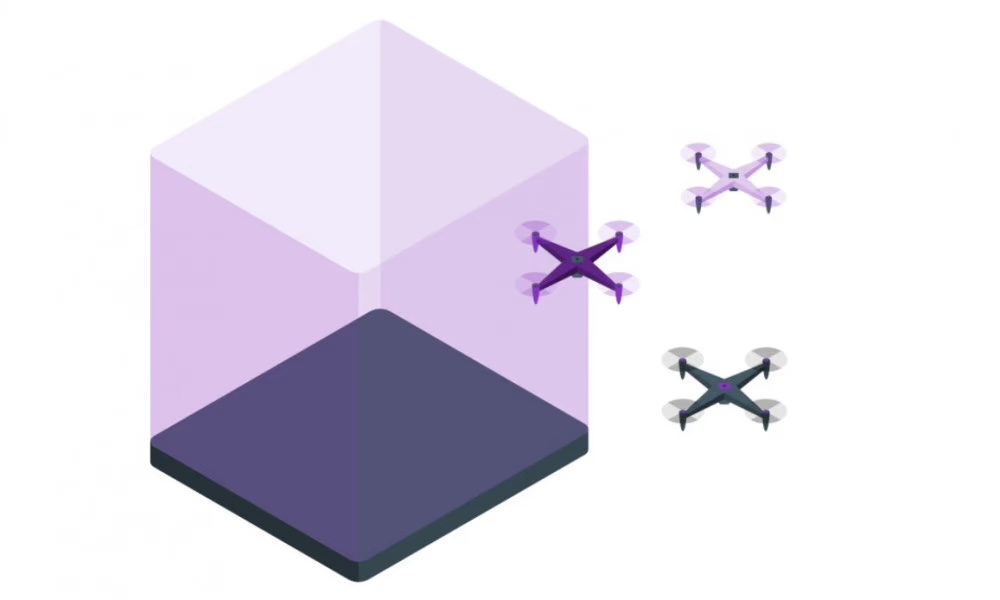
Drone geofencing diagram showing GPS-based virtual boundaries around restricted airspace near airports and sensitive areas
Geofencing uses GPS coordinates to create virtual boundaries. When a drone enters a geofenced zone, the system either blocks flight (hard geofencing) or displays a warning (soft geofencing). DJI switched from hard to soft enforcement in the US in January 2025.

Geofencing uses GPS coordinates to define virtual boundaries in three dimensions. When a drone's GPS reports that it is within a restricted boundary, the geofencing system responds: either by preventing flight, reducing speed or altitude, or warning the pilot without actively intervening.

Hard vs. soft geofencing

Hard geofencing physically prevents the drone from flying. Pre-2025 DJI software used hard geofencing around airports and other restricted areas: the motors would refuse to spin up if the GPS placed the drone inside a restricted zone. Soft geofencing displays warnings and may require the pilot to confirm they understand the restriction, but does not prevent flight. After the January 2025 US policy change, DJI switched from hard to soft geofencing for US operations.

Where geofencing data comes from

Geofencing data comes from multiple sources. FAA-regulated airspace data (Class B, C, D, E boundaries, TFRs, national parks, and special use airspace) is published through official channels including FAA Data Exchange and B4UFLY. DJI's FlySafe system incorporates FAA data plus additional manufacturer-defined zones (stadiums, prisons, sensitive facilities) that the FAA does not restrict but DJI chose to restrict. Other manufacturers use similar systems, though coverage and zone definitions vary.

Limitations of GPS geofencing

Geofencing is only as accurate as the GPS signal. Indoor flights, flights in urban canyons with GPS multipath, and flights at the edge of restricted zones can produce location errors. Geofencing is also a static system: it does not reflect real-time TFRs or pop-up airspace restrictions (wildfire TFRs, presidential movement zones) unless the data is updated. This is why pilots should always check B4UFLY or Aloft for real-time airspace before flying, even if their drone's geofencing system shows no restrictions.

DJI Geofencing Zones Explained

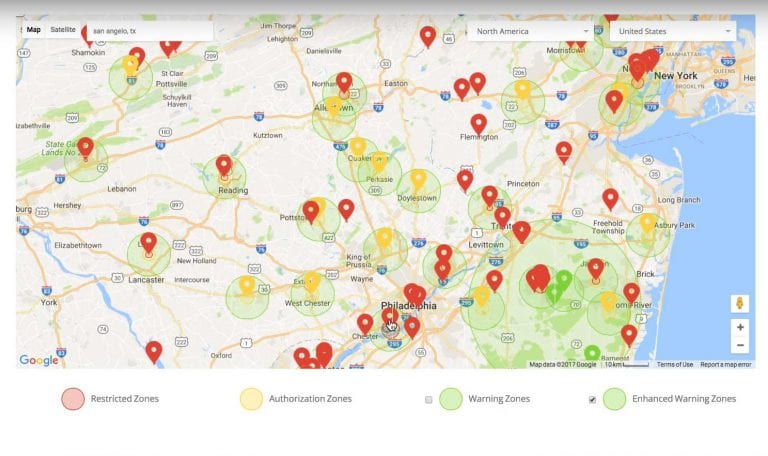
DJI FlySafe geo zone map showing color-coded restricted areas including red enhanced warning zones near airports and gray authorization zones
DJI's FlySafe system uses color-coded zones: red for areas requiring unlocking authorization, blue for altitude-limited zones, gray for advisory zones, and yellow for enhanced warning areas. The zone map is available at fly.dji.com/flysafe.

DJI's FlySafe system uses a color-coded zone system to indicate the type and severity of restriction. Understanding the zones tells you what action is required before flying.

DJI zone types

Zone ColorTypeWhat It Means
RedRestricted ZoneFlight is not permitted. Previously hard-blocked; now soft advisory in US as of Jan 2025.
BlueAuthorization ZoneFlight is permitted with online DJI unlocking. Typically Class C airspace near airports.
GrayEnhanced Warning ZoneAwareness zone; flight proceeds with pilot acknowledgment. Class D airports and similar.
YellowWarning ZoneAdvisory only. Pilot receives a warning but no unlocking is required.

The January 2025 US change in detail

Before January 13, 2025, DJI's red zones physically prevented takeoff without an unlock code obtained through DJI's authorization system. After the change, the red zone designation remains on the map but the software no longer prevents flight. Pilots still see the warning, but the drone will fly if the pilot proceeds. DJI stated the change was made because FAA authorization systems (LAANC) had matured enough that manufacturer-level hard blocking was redundant and was creating problems for pilots who had legitimate LAANC authorization but could not get DJI to recognize it.

What still applies

The DJI policy change affects DJI's software enforcement, not FAA law. Flying in Class B, C, D, or E airspace without LAANC authorization or a waiver is still illegal under 14 CFR Part 107, regardless of whether your drone will physically let you take off. The removal of hard geofencing means pilots are now fully responsible for their own airspace compliance. The FAA's rules did not change; DJI's enforcement did.

The legacy firmware exception

The January 2025 advisory-only change does not apply uniformly to all DJI hardware. Older DJI drones running legacy firmware may still enforce hard stops in restricted zones. If you fly a pre-2021 DJI model and have not updated firmware recently, you may still encounter hard blocks. The change also does not affect DJI enterprise operators using DJI Pilot 2 or the DJI Dock ecosystem, where hard geofencing enforcement is maintained for safety-critical commercial operations. If your drone is still hard-blocking after January 2025, check for a firmware update through the DJI Fly or DJI Pilot 2 app before attempting to fly.

FAA Geofencing Systems vs. Manufacturer Systems

There are two separate geofencing ecosystems that drone pilots interact with: FAA-regulated authorization systems and manufacturer-specific systems. They overlap but are not the same thing, and understanding the difference prevents confusion when your LAANC says yes but your drone's app says no (or vice versa).

FAA systems: LAANC and B4UFLY

LAANC (Low Altitude Authorization and Notification Capability) is the FAA's official system for granting real-time authorization to fly in controlled airspace near airports. LAANC operates through approved third-party apps (DJI Fly, Aloft, Kittyhawk) and provides immediate authorization for flights at or below published grid altitudes. B4UFLY is the FAA's advisory app showing airspace class, TFRs, and restrictions for any location. Neither system physically controls your drone. They create legal records and provide authorization that the pilot is responsible for having before flying.

Manufacturer systems: DJI FlySafe and others

DJI FlySafe is a manufacturer overlay that goes beyond FAA airspace data. FlySafe includes FAA-regulated zones plus DJI-defined zones around facilities DJI chose to protect (stadiums, prisons, nuclear plants, government buildings). Other manufacturers run comparable systems: Autel has its own zone database, though with less granular coverage than DJI. Most non-DJI drones do not have hard geofencing at all and leave compliance entirely to the pilot.

When they conflict

Before January 2025, pilots with valid LAANC authorization sometimes found DJI still blocking takeoff in the same airspace, requiring a separate DJI unlock. This was a friction point that the January 2025 change largely resolved for US pilots. Now DJI FlySafe in the US shows warnings but does not block LAANC-authorized flights. Outside the US, DJI's hard geofencing remains in effect in many markets. Check the DJI FlySafe map for your specific location and drone model.

How to Get Authorization to Fly in Geofenced Areas

Getting authorization to fly in restricted or geofenced areas depends on what type of zone it is and whether you are operating recreationally or commercially.

LAANC: the standard path for controlled airspace

LAANC provides automated authorization for flights in Class B, C, D, and some Class E airspace near airports, typically within seconds of the request. Open the DJI Fly app, Aloft, or another LAANC-connected app, input your planned flight location and altitude, and submit the authorization request. If your requested altitude is at or below the published UAS Facility Map grid altitude for that location, authorization is typically automatic. For altitudes above the grid or in complex airspace, the request goes to manual FAA review, which can take one to three business days.

DJI FlySafe self-unlock

For DJI-specific authorization zones that are not FAA-regulated (manufacturer-defined zones around stadiums, etc.), DJI provides a self-unlock system through the FlySafe portal at fly.dji.com/flysafe. Self-unlock requires a registered DJI account and accepts Part 107 certificate verification. After the January 2025 US change, self-unlock is no longer technically required to fly in the US since the zones are advisory only. But maintaining the unlock record provides documentation that you flew with awareness and intent, which matters if a complaint is later filed.

FAA waivers for complex operations

Operations that LAANC cannot authorize automatically (above grid altitudes in Class B, flying over crowds, night operations without proper lighting, beyond visual line of sight) require FAA waivers through FAA DroneZone. Waivers require a detailed application describing the operation, risk mitigation, and operator qualifications. Processing times vary from two weeks to several months depending on operational complexity.

Tip: The FAA B4UFLY app is the fastest way to check airspace at any location before flying. It shows current TFRs, airspace class, and links directly to LAANC authorization. Check it before every flight, even in locations you have flown before, since TFRs can appear with little notice.

What Geofencing Means for Drone Pilots in Practice

The practical effect of geofencing on day-to-day flying depends heavily on where you fly. Pilots who fly in rural areas far from airports may rarely encounter geofencing restrictions at all. Pilots who fly in urban areas or near airports encounter them constantly.

Flying near airports

The most common geofencing scenario is flying within the radius of a towered airport. Class D airports have 5-nautical-mile radii that overlap with many suburban areas. Within those radii, LAANC authorization is required for any commercial operation and recommended for recreational flights. The authorization process through DJI Fly or Aloft takes about 30 seconds for most grid-altitude requests. Getting in the habit of checking and obtaining authorization before every flight near an airport is the correct approach.

Temporary Flight Restrictions

TFRs are the most common geofencing scenario that pilots miss because they are not permanent. TFRs appear around wildfires, presidential movement routes, major sporting events, disaster areas, and other temporary situations. These do not show up in manufacturer geofencing maps because they change daily. B4UFLY and Aloft pull live FAA TFR data. DJI Fly does not always reflect current TFRs promptly. Always check a live source before flying near any active event or emergency.

What DJI FlySafe does NOT cover

The most dangerous misunderstanding about geofencing is assuming that if the map looks clear, the flight is legal. DJI FlySafe consistently fails to capture four categories of restriction:

  • Temporary Flight Restrictions (TFRs): Wildfire TFRs, presidential movement zones, and breaking news TFRs appear with little notice. DJI Fly does not reliably reflect current TFRs. Check B4UFLY or Aloft before every flight for live TFR data.
  • National Park Service boundaries: Flying in national parks is governed by NPS regulations (a federal land rule), not FAA airspace classification. The map can show open airspace while the ground below is completely off-limits to drone flight.
  • Stadium TFRs during events: FAA 14 CFR 91.145 creates a 3-nautical-mile TFR up to 3,000 feet AGL for major sporting and entertainment events. These are time-limited and do not appear in static geofencing maps.
  • State and local laws: City park bans, school proximity rules, and state-level drone restrictions are not encoded in any manufacturer geofencing system. A clear DJI map tells you nothing about whether the local ordinance allows the flight.

The pilot is always responsible

The most important point about geofencing is that it is a tool, not a guarantee. Before January 2025, many pilots believed their drone would physically stop them from doing something illegal. It did not stop everything, and now in the US it stops even less. Airspace compliance is the pilot's legal responsibility under 14 CFR Part 107, regardless of what the drone's software does or does not prevent. The FAA does not accept "my drone let me take off" as a defense for flying in unauthorized airspace.

FAQ

Geofencing is a GPS-based system that creates virtual boundaries around restricted airspace. When a drone enters a geofenced zone, the system either prevents flight (hard geofencing) or displays a warning (soft geofencing). DJI, Autel, and other manufacturers build geofencing into their apps. The FAA also maintains airspace authorization systems (LAANC) that are separate from manufacturer geofencing.

DJI switched from hard geofencing to soft (advisory-only) geofencing for US operations on January 13, 2025. Before this date, DJI software would physically prevent takeoff in restricted zones. After the change, the restricted zones still appear on the map and warnings still display, but the software no longer blocks flight. FAA airspace laws did not change; only DJI's enforcement mechanism changed.

Use the DJI FlySafe self-unlock system at fly.dji.com/flysafe. Log in with your DJI account, enter your flight location and time, and submit the unlock request. Part 107 certificate holders can unlock authorization zones. For FAA-regulated controlled airspace, you also need separate LAANC authorization through DJI Fly or another approved app. After the January 2025 US change, self-unlock is no longer required to fly but creates documentation of authorized intent.

DJI uses color-coded zones in its FlySafe system: red zones are restricted areas (airports, sensitive facilities), blue zones require online authorization, gray zones are enhanced warning areas, and yellow zones are advisory warnings. Before January 2025, red zones hard-blocked flight. Now in the US all zones are advisory, though authorization is still required by FAA law for controlled airspace.

No. Geofencing only prevents flights by drones whose software enforces it, and even DJI switched to advisory-only enforcement in the US in 2025. Drones without geofencing (older models, modified firmware, or non-DJI platforms) are not affected at all. Pilots are legally responsible for airspace compliance under FAA Part 107 regardless of whether their drone's software would have blocked the flight.

LAANC (Low Altitude Authorization and Notification Capability) is the FAA's official system for granting real-time authorization to fly in controlled airspace near airports. It is separate from manufacturer geofencing. LAANC provides legal authorization through apps like DJI Fly, Aloft, and Kittyhawk. Having LAANC authorization means you are legally permitted to fly; geofencing (or its absence) is the manufacturer's software response, not the legal standard.

For recreational flights in controlled airspace, you need LAANC authorization through a compatible app. For DJI-specific authorization zones, self-unlock through FlySafe was previously required but is now advisory-only in the US after the January 2025 change. Getting authorization is still the right approach: it creates a legal record, and flying in controlled airspace without authorization is illegal regardless of what the drone's software allows.

A no-fly zone in drone geofencing terms is a restricted area where flight is prohibited or requires authorization. Near airports, these are FAA-regulated Class B, C, and D airspace boundaries. DJI's FlySafe system also includes manufacturer-defined no-fly zones around facilities like prisons, stadiums, nuclear plants, and national security areas that are not FAA-regulated but DJI chose to restrict. Check both B4UFLY (for FAA zones) and the DJI FlySafe map (for manufacturer zones) before flying.

Paul Posea

Paul Posea

Author · Dronesgator

Paul Posea is the founder of Dronesgator and has been reviewing and comparing drones since 2015. With a Part 107 certification, 195 YouTube drone reviews, and published work on Digital Photography School, he combines hands-on flight testing with data-driven analysis to help pilots find the right drone.

Marcus Taylor

Marcus Taylor

Expert Reviewer · Deployed Consultancy Ltd

Marcus Taylor is a UK CAA certified drone pilot and owner of Deployed Consultancy Ltd. With 6 years of commercial experience spanning UN site surveys in West Africa, aerial photography across Europe, Africa, and Japan, and defence consulting, he verifies the technical accuracy of Dronesgator's drone reviews and guides.