• Find My Drone

Where Is the Serial Number on My DJI Drone? (Every Model)

Updated

By Paul Posea

Where Is the Serial Number on My DJI Drone? (Every Model) - drone reviews and comparison

Why You Need Your DJI Drone Serial Number

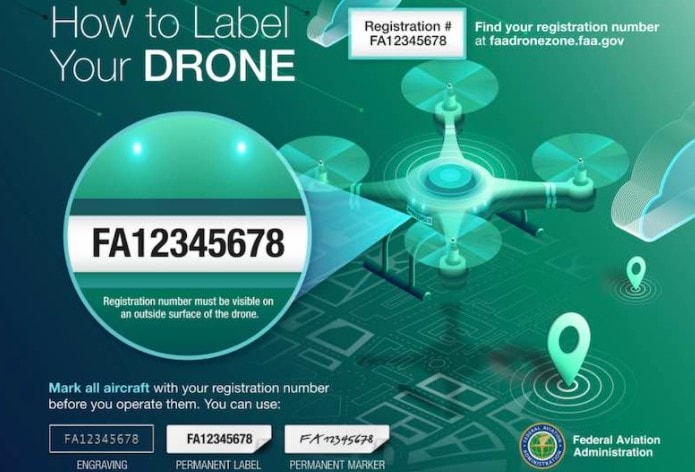
How to label your DJI drone for FAA registration and identification
FAA requires a visible registration number on your drone and serial numbers are needed for DJI account registration
FAARegistration requires it
48 hrsDJI Care Refresh window
$5FAA registration fee

FAA Registration

The FAA requires you to enter your drone's serial number when registering through FAA DroneZone. This applies to all drones weighing 250g or more, and to any drone used for commercial purposes regardless of weight. The serial number ties the physical aircraft to your registration, and the FAA expects you to have it visible on the drone without requiring tools to access it.

DJI Care Refresh Activation

DJI Care Refresh must be activated within 48 hours of your first flight. The activation process requires the serial number to bind the coverage plan to your specific drone. If you enter the wrong serial number or cannot find it within the 48-hour window, you lose the ability to add DJI Care Refresh to that aircraft. There is no extension or workaround.

Warranty Claims and Theft Reports

Filing a warranty claim with DJI Support requires the serial number to verify purchase date and coverage status. If your drone is stolen, a police report needs the serial number to identify the property. DJI can also flag stolen serial numbers in their system if you provide it to them with a police report number.

Tip: Photograph your drone's serial number label the day you unbox it. Store the photo in a cloud folder or note app so you always have it available, even if the physical label wears off or the drone is lost.

Serial Number Location on DJI Mini Series Drones

DJI drone serial number location under front arm Mini 4 Pro Mini 3
On the DJI Mini series, the serial number is printed under the front-left arm

DJI Mini 4 Pro, Mini 3, and Mini 3 Pro

On the Mini 4 Pro, Mini 3, and Mini 3 Pro, the serial number is printed on a small white label under the front left arm. To find it, unfold the front arms and look at the underside of the left arm, close to where the arm meets the body. The text is small but legible. The label includes the serial number, model identifier, and a QR code.

DJI Mini 5 Pro

The Mini 5 Pro follows the same placement pattern. Unfold the front left arm and look underneath it near the hinge. DJI has kept this location consistent across all Mini series models since the original Mavic Mini, so if you have owned a previous Mini, the serial number is in the same spot.

DJI Mini 4K

The Mini 4K is slightly different. The serial number is on a label inside the battery compartment. Remove the battery and check the sticker on the bottom interior of the battery bay. This is because the Mini 4K has a fixed-arm design that does not fold, so there is no arm underside to use.

Finding It in the DJI Fly App

With any Mini series drone powered on and connected to your controller and phone, open DJI Fly, tap the "Me" icon in the bottom navigation, then tap "Device Management." Your drone's serial number appears under the device listing. You can also find it in the main camera view by tapping the three-dot menu, then "About" or "Safety."

Note: The app only shows the serial number while the drone is connected and powered on. If the drone is damaged, lost, or the battery is dead, the app method will not work. Always record the serial number separately.

Serial Number Location on DJI Air and Mavic Series

DJI Mavic 3 series serial number location inside battery compartment
Air and Mavic series drones store the serial number inside the battery compartment on a white label

DJI Air 3S and Air 3

On the Air 3S and Air 3, the serial number is inside the battery compartment. Press the battery release tabs, slide the battery out, and look at the sticker on the bottom of the battery bay. The serial number is printed in a standard barcode format alongside the model name and regulatory information.

DJI Mavic 4 Pro

The Mavic 4 Pro uses the same battery compartment placement. Remove the intelligent flight battery and check the interior sticker. The label is on the flat surface at the bottom of the compartment, oriented so you can read it with the drone's nose facing away from you.

Older Mavic Models (Mavic 2, Mavic 3, Mavic 3 Pro)

The Mavic 2 Pro, Mavic 2 Zoom, Mavic 3, and Mavic 3 Pro all follow the same convention. Remove the battery and check the sticker inside the battery compartment. DJI has used this placement on every Mavic-class drone since the original Mavic Pro in 2016.

DJI Fly App Method

The same app method works for Air and Mavic series drones. Open DJI Fly with the drone connected, navigate to Me, then Device Management, and the serial number is listed under your connected device. On Mavic 3 Enterprise models that use DJI Pilot 2 instead of DJI Fly, the serial number is in Settings, then About.

Tip: If the battery compartment label is hard to read, use your phone's camera with the flash on. The labels use small print that can be difficult to read in low light.

Serial Numbers on DJI Controllers and Accessories

DJI flight controller serial number location on RC controller back panel
DJI RC controllers have their serial number printed on the back panel or inside the battery compartment

DJI RC 2 Controller

The RC 2 controller's serial number is on a small sticker on the back of the controller, near the bottom edge close to the USB-C charging port. Flip the controller over and look at the lower section below the antenna housings. The label includes the serial number, model code, and FCC ID.

DJI RC-N3 and RC-N2 Controllers

The RC-N3 and RC-N2 controllers have their serial number in the same location: a label on the back panel near the USB-C port. On these phone-holder controllers, the label is smaller because the back panel has less surface area than the RC 2's built-in screen housing.

DJI Goggles 3

The DJI Goggles 3 serial number is printed on the inside of the right temple piece (the arm that goes over your ear). You need to extend the temple piece fully to read the small label. This is a less intuitive location, so it is commonly missed during initial setup.

Finding Controller Serial Numbers in the App

If the physical label is worn off or unreadable, open the DJI Fly app while the controller is connected. Navigate to Settings (gear icon in the camera view), then scroll to "About" at the bottom. The controller serial number is listed separately from the aircraft serial number. This works even without the drone powered on, as long as the controller is running and connected to the app via phone.

Note: Controller serial numbers are separate from aircraft serial numbers. FAA registration uses the aircraft serial number, not the controller's. DJI Care Refresh for controllers (available in some markets) uses the controller serial number specifically.

How to Register Your DJI Serial Number with the FAA

Step-by-Step Registration

  1. Go to faadronezone.faa.gov and create an account or log in
  2. Select "Register" from the dashboard and choose the appropriate category (Part 107 for commercial, recreational for hobby use)
  3. Click "Add Drone" and enter your DJI serial number exactly as printed on the label
  4. Pay the $5 registration fee (valid for 3 years)
  5. Print your registration certificate and the FAA-issued registration number
  6. Mark the registration number on the exterior of your drone where it is visible without tools

Why Physical Marking Matters

FAA rules require your registration number to be visible on the exterior of the drone without needing to open a compartment or remove a battery. This changed in 2019, when the FAA moved from allowing interior marking to requiring exterior marking for safety reasons. Use a small label maker or write the number with a fine-tip permanent marker on the outside of the battery compartment door or the underside of the drone body.

Remote ID and Serial Number Relationship

Under FAA Remote ID rules, your drone broadcasts its serial number during flight. DJI drones with firmware updates from 2023 onward include Standard Remote ID compliance, which broadcasts the aircraft serial number, location, altitude, and ground control station location. The serial number in the Remote ID broadcast matches what is printed on the physical label and registered in FAA DroneZone.

Warning: Do not enter your controller serial number in the FAA DroneZone registration. Only the aircraft serial number is used for FAA registration. Entering the wrong number means your drone is technically unregistered, which carries a civil penalty of up to $27,500.

For a full walkthrough of the FAA registration process, see our drone license cost guide which covers both registration and Part 107 certification fees.

FAQ

The serial number on a DJI Mini 4 Pro is printed on a small white label under the front left arm. Unfold both front arms and look at the underside of the left arm near the hinge where it meets the body. The label includes the serial number, model identifier, and a QR code.

The DJI Air 3S serial number is inside the battery compartment. Remove the intelligent flight battery by pressing the release tabs and sliding it out. The serial number is printed on a sticker on the bottom interior surface of the battery bay.

Check the physical label on the drone itself (under the front arm for Mini series, inside the battery compartment for Air and Mavic series). You can also find it in the DJI Fly app under Me > Device Management when the drone is connected and powered on. If you previously connected the drone while logged into your DJI account, the serial number is stored in your account history.

Yes. Open DJI Fly with your drone powered on and connected to the controller. Tap the Me icon, then Device Management. Your aircraft serial number is listed under the device entry. You can also find it in the camera view by tapping the three-dot menu and selecting About or Safety.

The DJI Mavic 4 Pro serial number is on a sticker inside the battery compartment. Remove the intelligent flight battery and look at the flat surface on the bottom of the battery bay. The label shows the serial number, model code, and regulatory information.

Yes. DJI Care Refresh activation requires your aircraft serial number to bind the service plan to your specific drone. You must activate DJI Care Refresh within 48 hours of your first flight. If you cannot provide the correct serial number within that window, you lose the ability to add the coverage.

The DJI RC 2 controller serial number is on a small sticker on the back of the controller, near the bottom edge close to the USB-C charging port. Flip the controller over and look at the lower section below the antenna housings. It is separate from the aircraft serial number.

If the physical label is unreadable, connect the drone to the DJI Fly app and check Me > Device Management or Settings > About for the serial number. The original product box also has a barcode label with the serial number. If the drone was previously connected while you were logged into your DJI account, the serial number is stored in your account. Contact DJI Support with your purchase receipt if all other methods fail.

Paul Posea

Paul Posea

Author · Dronesgator

Paul Posea is the founder of Dronesgator and has been reviewing and comparing drones since 2015. With a Part 107 certification, 195 YouTube drone reviews, and published work on Digital Photography School, he combines hands-on flight testing with data-driven analysis to help pilots find the right drone.